How to download TikTok audio in 4 steps
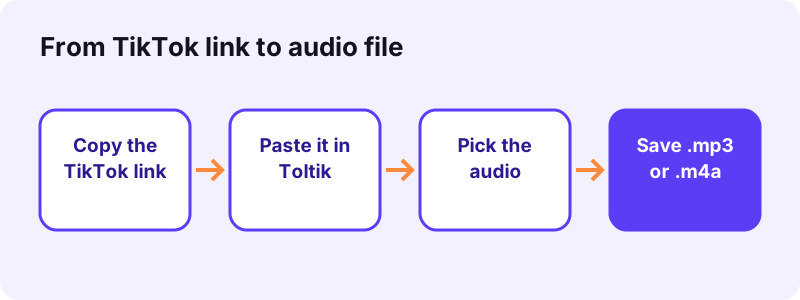
- Copy the link. In TikTok, tap Share on the video, then Copy link.
- Paste it in Toltik. Open Toltik in any browser and paste the link into the box at the top of this page.
- Choose the audio. Toltik lists the files TikTok serves for that post. Pick the audio option.
- Save the file. Your browser saves the sound as .mp3 or .m4a, exactly as TikTok stores it.
Save any TikTok sound as an audio file
A TikTok MP3 is simply the sound of a TikTok post saved on its own, without the picture. Paste the link of any public video above and Toltik gives you the audio track that TikTok already serves for that post. It works in the browser on iPhone, Android and computers, with no app and no account.
This page explains how to download TikTok audio on each device, why some files arrive as .m4a instead of .mp3, how to turn a sound into a ringtone, and what you may and may not do with the music. If you want the full video instead, use the TikTok video downloader.
- Free, with no limit on the number of downloads.
- No app, no extension, no sign-up.
- Works with tiktok.com, m.tiktok.com, vm.tiktok.com and vt.tiktok.com links.
- The sound comes as TikTok stores it: .mp3 or .m4a (AAC).
What you get from the TikTok MP3 downloader
When you paste a link, Toltik reads the public post and lists every file TikTok offers for it. The audio option is the sound attached to the post. You get the original track, not a re-recording, so the quality is the same as what you hear in the app.
Audio file details
| Item | What to expect |
|---|---|
| Format | .mp3 or .m4a (AAC audio), as TikTok stores the sound |
| Length | The sound used in the post, often 15 s to 3 min |
| Quality | The original bitrate TikTok serves, not re-encoded |
| Price | Free, no account, no download limit |
| Link lifetime | Download links expire after 1 hour |
Other files from the same link
The same link can also give you the video without the watermark, an HD copy when one exists, and the cover image. For slideshow posts, every picture is available as a JPG on the TikTok photo downloader.
How to download TikTok audio on iPhone
On iPhone and iPad, Safari handles the whole job. Since iOS 13, Safari can download files directly, so there is nothing to install.
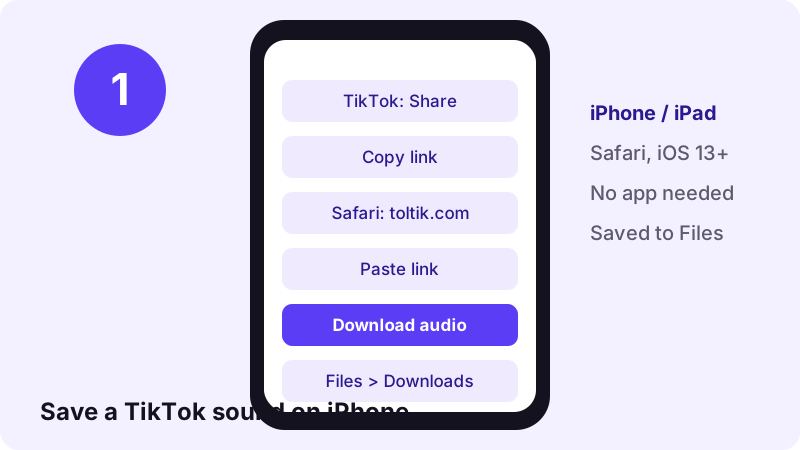
- Open TikTok, tap Share on the video, then Copy link.
- Open Safari and go to toltik.com/tiktok-mp3/.
- Paste the link into the box and tap the download button.
- Tap the audio option and confirm Download.
- Open the Files app, then Downloads, to find the sound.
Where iPhone saves the TikTok MP3
Safari puts downloads in Files → On My iPhone → Downloads by default, or in iCloud Drive → Downloads if you changed the setting. Audio files do not go into the Music app automatically. Play them from Files, or import them into an editor or GarageBand.
How to save a TikTok sound on Android
On Android, Chrome or any other browser works. The steps are almost the same as on iPhone.
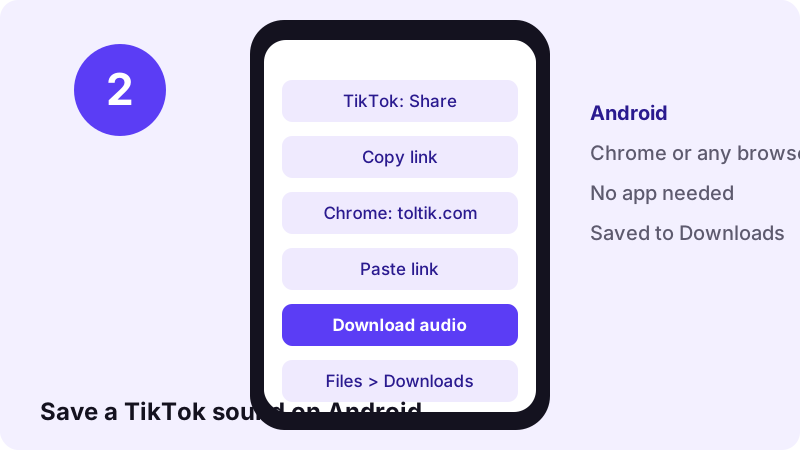
- In TikTok, tap Share and then Copy link.
- Open Chrome and visit toltik.com/tiktok-mp3/.
- Paste the link and tap the download button.
- Choose the audio file. Chrome shows a download notice at the bottom.
- Open Files or My Files and look in Downloads.
Finding the file on Android
Most music players scan the Downloads folder, so the sound often appears in your player within a minute. If it does not, open it from the Files app or move it into the Music folder. Folder names vary slightly between phone brands.
How to get TikTok MP3 files on a computer
On Windows, Mac or Linux, any modern browser works. You do not need a browser extension or a desktop program.
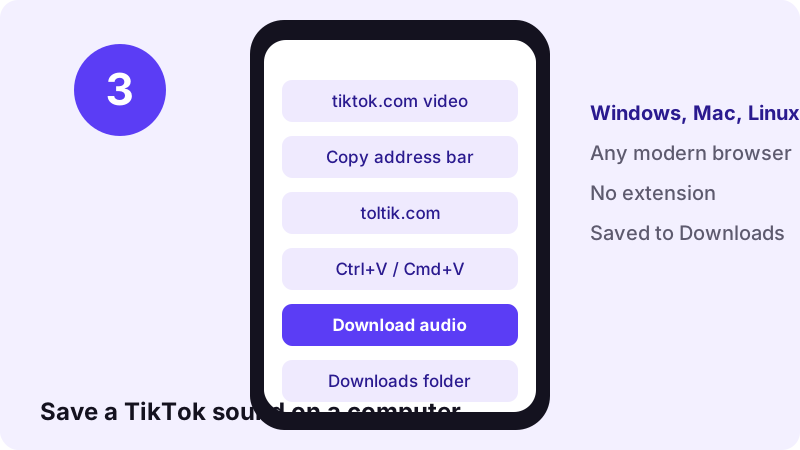
- Open the video on tiktok.com and copy the address from the address bar, or use Share → Copy link.
- Go to toltik.com/tiktok-mp3/ and paste with Ctrl+V (Windows, Linux) or Cmd+V (Mac).
- Click the download button, then the audio option.
- Open your Downloads folder to find the file.
Tip for desktop editors
A computer is the easiest place to work with the sound afterwards. You can drag the file straight into a video editor, a DAW or Audacity to cut it, fade it or change the volume.
TikTok to MP3: why some files are M4A
TikTok stores sounds in two ways. Some are plain MP3 files. Others are AAC audio inside an MP4 container, which uses the .m4a extension. Toltik does not convert anything: it delivers the file exactly as TikTok stores it, so you get the original quality with no extra loss.
That is why a TikTok to MP3 download may end in .m4a. This is normal, and it is not a broken file. AAC is the same audio format Apple Music and YouTube use, and at similar bitrates it usually sounds as good as MP3 or better.
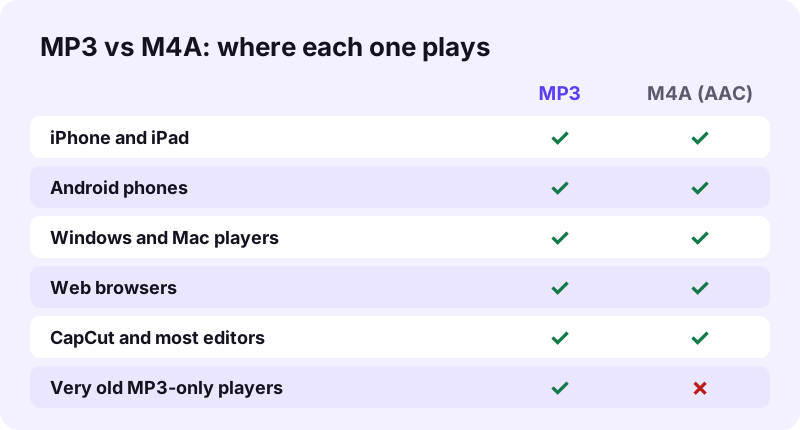
Does M4A play everywhere?
Yes, on almost every device made in the last decade. iPhone, iPad, Android, Windows, macOS, Chrome, Safari, Firefox and video editors all play M4A. You only need MP3 for some very old portable players or car stereos that read MP3 and nothing else.
| Format | Extension | Typical use | Plays on phones |
|---|---|---|---|
| MP3 | .mp3 | Universal music files, old players | Yes |
| AAC in MP4 | .m4a | Streaming, Apple devices, editors | Yes |
How to convert a TikTok sound from M4A to MP3
If a device really needs MP3, convert the file yourself with free software. Converting from AAC to MP3 re-encodes the audio, so keep the original file and convert a copy.
With VLC on Windows, Mac or Linux
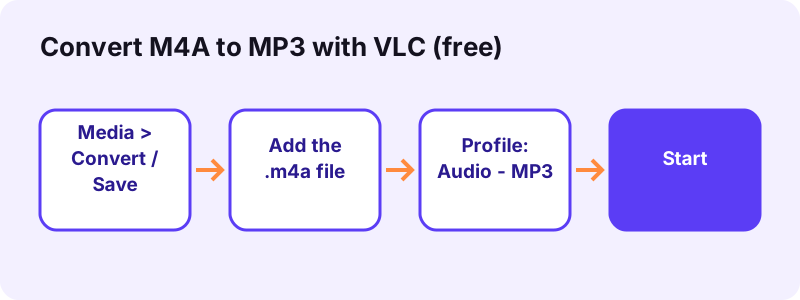
- Open VLC and choose Media → Convert / Save (on Mac: File → Convert / Stream).
- Add the .m4a file and click Convert / Save.
- Pick the profile Audio - MP3.
- Choose a destination file name ending in .mp3 and press Start.
With Audacity
Open the .m4a file in Audacity, then use File → Export and choose MP3. Audacity is also handy if you want to trim the sound or remove silence before you export it.
On a phone
Many phones can do this without a third-party site. On iPhone, a Shortcuts action called Encode Media can save audio in another format. On Android, some built-in file managers and audio editors offer an export or convert option. Menu names differ by model, so check your phone's own tools first.
Choose 128 kbps or higher when you export. A higher setting cannot add quality that the original sound does not have.
TikTok MP3 file size and quality
Audio files are small. The size depends on the bitrate, which is how many kilobits of sound are stored per second. At 128 kbps, one second of sound takes 16 KB, so one minute takes about 960 KB, or roughly 0.96 MB.
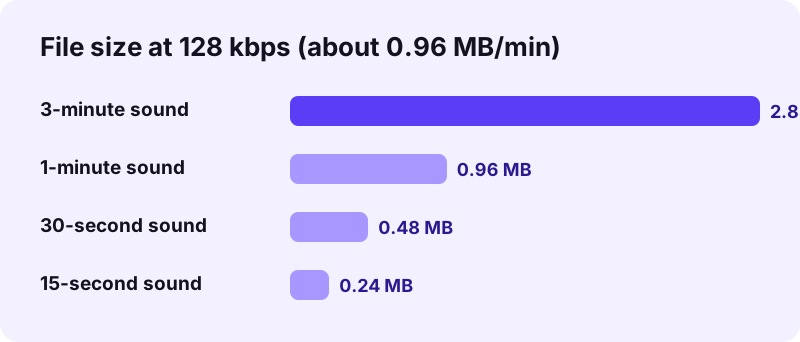
| Sound length | Size at 128 kbps | Size at 64 kbps |
|---|---|---|
| 15 seconds | ≈ 0.24 MB | ≈ 0.12 MB |
| 30 seconds | ≈ 0.48 MB | ≈ 0.24 MB |
| 60 seconds | ≈ 0.96 MB | ≈ 0.48 MB |
| 3 minutes | ≈ 2.88 MB | ≈ 1.44 MB |
Why quality can differ between sounds
Toltik cannot make a sound better than TikTok's copy. A sound recorded on a phone mic in a noisy room stays noisy. Official tracks uploaded by labels usually sound cleaner than an original sound filmed at a concert.
Original sound vs licensed music
Every TikTok sound has a name under the video. That name tells you what kind of audio it is, and that matters for how you may use it.
Original sound
A sound marked original sound - username was recorded or uploaded by that creator. It may be their voice, a skit, a voiceover or a sound they made. It can also be a clip of someone else's song that TikTok did not match to a licensed track.
Licensed music
When the sound shows a song title and artist, it comes from TikTok's music library. TikTok licenses these songs for use inside the app. That licence does not extend to your downloaded copy, so the song is still protected by copyright outside TikTok.
| Sound type | How it looks | Who owns it |
|---|---|---|
| Original sound | original sound - username | Usually the creator, unless it copies a song |
| Licensed track | Song title - Artist | The artist and label |
| Commercial sound | Short, library audio | The rights holder named in TikTok |
Copyright: how to use a downloaded TikTok MP3 fairly
Downloading a sound for yourself is one thing. Publishing it again is another. Commercial songs are protected, and most creators expect credit when their voice or idea travels.
- Keep each TikTok MP3 for personal use, such as listening offline or a private ringtone.
- Credit the creator or the artist whenever you share something that uses their sound.
- Do not re-upload a song as your own, or sell or stream it.
- Ask for permission before using someone's sound in a commercial project.
- Buy or stream the full song if you like it. It supports the artist.
Toltik does not store videos or sounds and keeps no list of the links you paste. Read more on our privacy page.
Use a TikTok sound as a ringtone or alarm
A short, catchy TikTok MP3 makes a good ringtone. Trim it first so the best part plays right away. Ringtones work best between 15 and 30 seconds.
Android ringtone
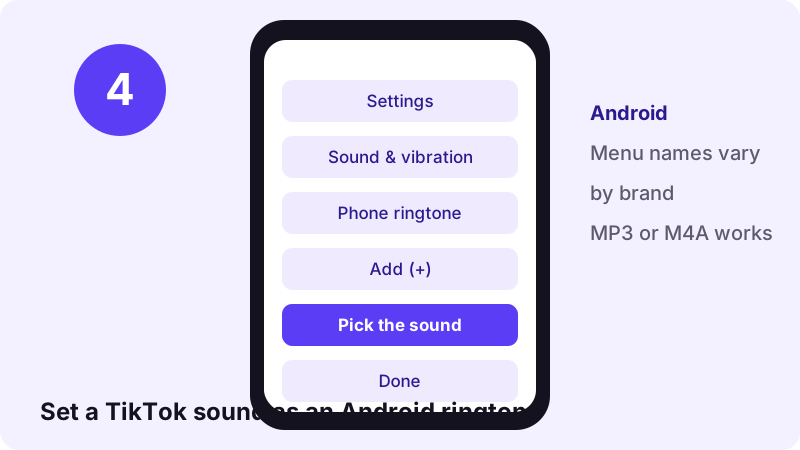
- Open Settings → Sound & vibration → Phone ringtone.
- Tap + or Add from device.
- Choose the downloaded sound in Downloads.
- For an alarm, open the Clock app, edit the alarm, tap the sound and add the file the same way.
iPhone ringtone with GarageBand
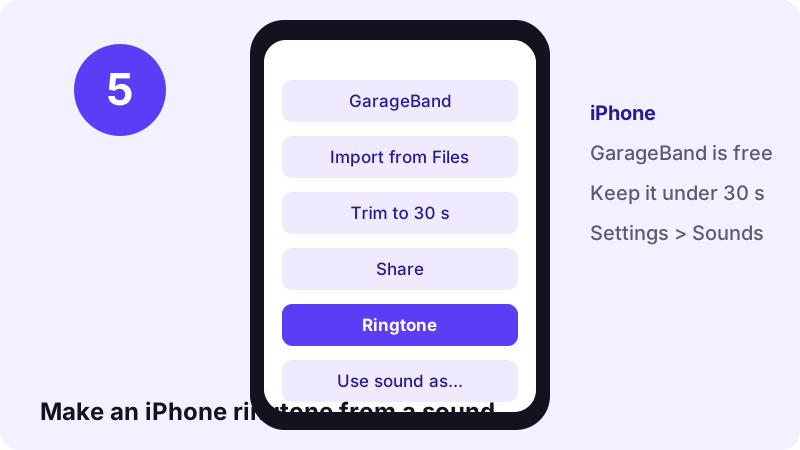
- Install GarageBand (free from Apple) and open a new Audio Recorder project.
- Tap the loop icon, then Files, and drag the sound onto the track.
- Trim it to 30 seconds or less.
- Go to My Songs, long-press the project, tap Share → Ringtone.
- Choose Use sound as Standard Ringtone or a contact ringtone.
iPhone alarms can use ringtones too: in the Clock app, edit an alarm, tap Sound and pick your new tone.
Edit or reuse a sound in a video editor
Many people save a TikTok sound to edit it into their own clip. Video editors such as CapCut, iMovie, VN or desktop editors all accept MP3 and M4A files.
- Import the file through the editor's audio or music menu, usually under Extract, My files or Import.
- Trim the start so the beat lines up with your first cut.
- Lower the music volume under speech so voices stay clear.
- Add a short fade at the end to avoid a hard stop.
If you plan to post the result on TikTok, it is often better to use the sound from TikTok's own library inside the app. That keeps the link to the original sound and its licence.
TikTok MP3 download problems and fixes
Most problems come from the link or from the post itself. Check these points before trying again.
The link does not work
- Copy the link again with Share → Copy link, not from a screenshot or text.
- Remove extra words if you pasted a whole message.
- Make sure the post is public. Private, deleted and region-blocked posts cannot be read.
- A story only works while it is live, for 24 hours. See the TikTok story downloader.
The file will not play
- If it ends in .m4a, open it with VLC or your phone's player. It is a normal AAC file.
- If you need MP3, convert a copy as shown above.
- If the download stopped early, try again on a stable connection.
The download link stopped working
Download links expire after one hour. Paste the TikTok link again to get a fresh one.
| Problem | Likely cause | Fix |
|---|---|---|
| “Video not found” | Private, deleted or blocked post | Use a public post |
| File is .m4a | TikTok stores the sound as AAC | Play it or convert a copy |
| Nothing happens on iPhone | Very old iOS version | Update to iOS 13 or later |
| Link expired | Older than 1 hour | Paste the TikTok link again |
Why use a web TikTok MP3 tool instead of recording
You could record the sound with a second phone or a screen recorder. The result picks up room noise, notification sounds and taps, and it never starts or ends cleanly. Saving the file keeps the actual audio track.
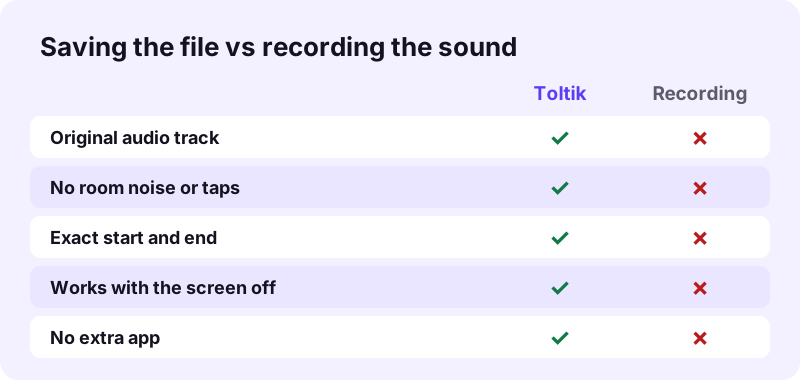
- No app to install and no account to create.
- Same steps on iPhone, Android and computers.
- No watermark or extra sound added to the audio.
- Nothing is stored on our side; links expire after 1 hour.
Frequently asked questions
Is the TikTok MP3 downloader free?
Yes. Toltik is free, needs no account and has no limit on the number of downloads.
Why did my download save as .m4a and not .mp3?
TikTok stores some sounds as AAC audio in an MP4 container (.m4a). Toltik delivers the file as TikTok stores it, without converting it, so you keep the original quality.
Will an M4A file play on my phone?
Yes. iPhone, iPad and Android phones play M4A files, as do Windows, Mac and web browsers. Only some very old MP3-only players need MP3.
How do I convert TikTok audio to MP3?
Use a free desktop app such as VLC (Media → Convert / Save, profile Audio - MP3) or Audacity (File → Export as MP3). Convert a copy and keep the original.
Can I download the sound of a private TikTok?
No. Toltik only reads public posts. Private, deleted and region-blocked posts cannot be downloaded.
Do I need an app to save TikTok sounds?
No. It works in Safari, Chrome and any modern browser on iPhone, Android, Windows, Mac and Linux.
Where is the TikTok MP3 saved on iPhone?
In the Files app, under Downloads (On My iPhone or iCloud Drive, depending on your Safari setting).
Can I use a downloaded TikTok song in my own videos?
Licensed songs stay protected by copyright outside TikTok. Use them for personal purposes, credit the creator or artist, and do not re-upload or sell them. For TikTok posts, use the sound from TikTok's library.
Can I make a ringtone from a TikTok sound?
Yes. On Android, add the file in Settings → Sound → Phone ringtone. On iPhone, import it into GarageBand, trim it to 30 seconds and share it as a Ringtone.
Does Toltik keep the sounds I download?
No. Toltik does not store videos or sounds, and download links expire after one hour.