How to download TikTok stories in 3 steps
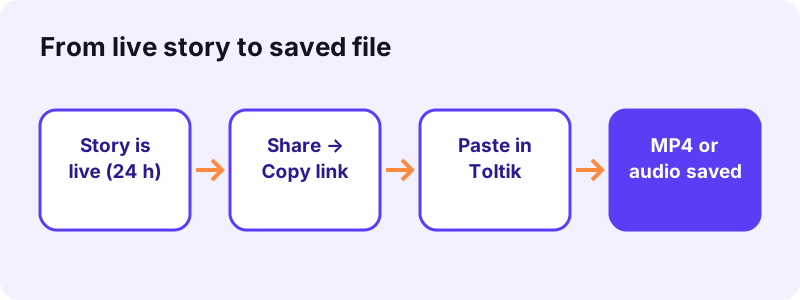
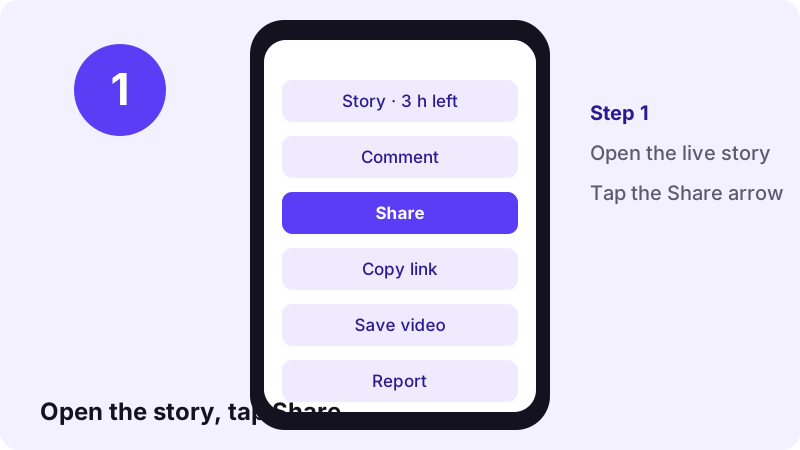
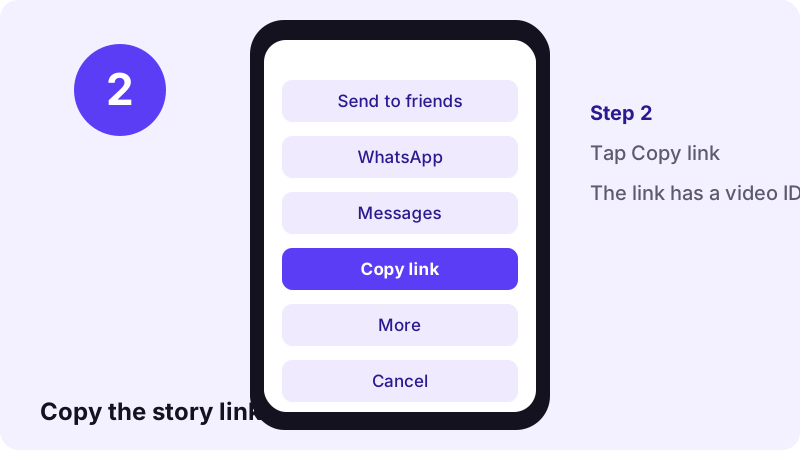
- Open the story and copy its link. Open the story in the TikTok app or on the website, tap Share, then Copy link. Do this while the story is still live, because it disappears after 24 hours.
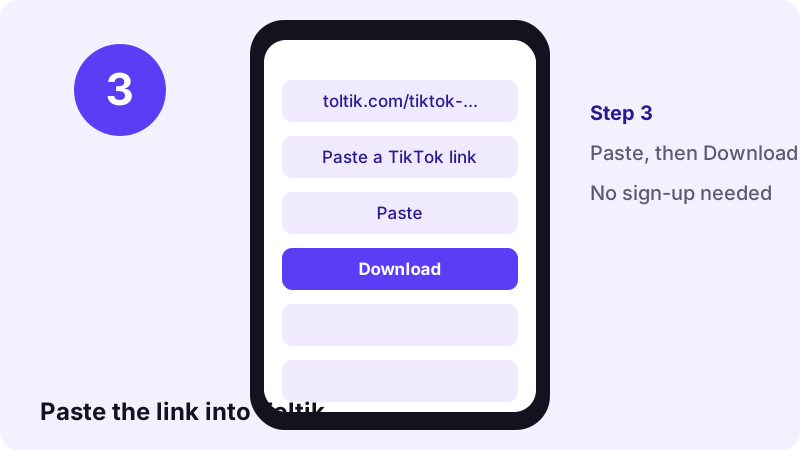
- Paste the link into Toltik. Come back to this page, tap Paste (or long-press the box and paste), then tap Download. Toltik reads the public post behind the link.
- Choose a file and save it. Pick the MP4 without watermark, the HD MP4 when it is offered, or the audio file. On iPhone the file goes to Files → Downloads; on Android it goes to the Downloads folder.
What is a TikTok story downloader?
A TikTok story is a short video or photo that stays on a profile for 24 hours and then disappears. A tiktok story downloader is a web tool that takes the link of a live story and gives you the file behind it, so you keep a copy after the timer runs out.
Toltik works in the browser. There is no app to install, no account to create and no limit on how many stories you save. It only reads stories that are public, and only while they are still online.
What you can save from a story
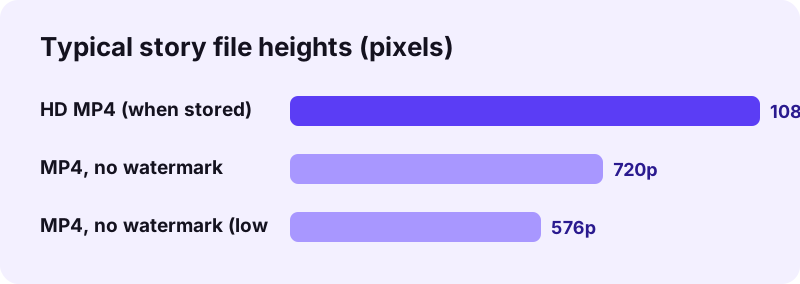
- The video as an MP4 without the TikTok watermark (usually 576p–720p).
- An HD MP4 when TikTok stores one for that story (often 1080p).
- The MP4 with the watermark, when TikTok offers it.
- The sound alone as an audio file (MP3 or M4A, as TikTok stores it).
- The cover image of the story.
Who it is for
- Creators who want a clean archive of the stories they post.
- Social media managers who keep a record of a brand's own stories.
- Anyone who has permission from a friend to keep a story they made together.
Why use a tiktok story downloader when TikTok has a Save button?
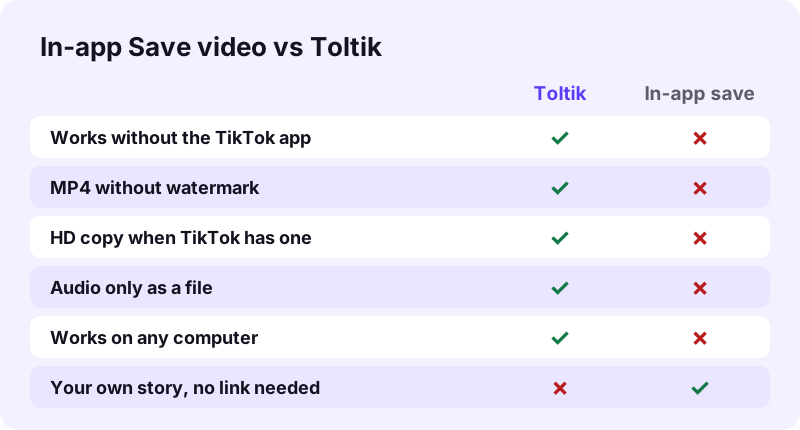
TikTok lets you save your own stories from inside the app, and some creators allow downloads of theirs. So why use a separate tool? Because the in-app copy has limits that matter once you want to reuse the clip.
Clean video without the watermark
The copy you save in the app often carries the moving TikTok logo and your username. Toltik offers an MP4 without that watermark, which is easier to keep in an archive or to edit into a longer video of your own.
HD quality when it exists
When TikTok keeps a higher-quality version of the story, Toltik shows an HD MP4 next to the normal file. You pick the one you want. Not every story has an HD copy, so the button only appears when there is one.
Save from a device that did not post it
You may have filmed the story on your phone but want the file on a laptop. Copy the link, open Toltik on the computer and download it there. No transfer cable, no cloud app, no sign-in on a shared machine.
How to save your own TikTok story inside the app
If the story is yours and you only need a quick copy on the same phone, the app can do it. Menus change between TikTok versions, so the exact labels on your screen may differ a little from the ones below.
- Open your profile and tap your profile picture with the story ring to play the story.
- Tap the three dots (More) or the Share arrow on the story.
- Look for Save video and tap it.
- Wait for the save to finish; the clip lands in your camera roll or gallery.
The app copy is fine for a quick backup. If you want it without the watermark, in HD, or on another device, use the steps at the top of this page instead.
Can you save someone else's story in the app?
Only if the creator has left downloads switched on for their content. If they have turned downloads off, the Save option is missing. Respect that choice: it is a clear sign the creator does not want copies made.
Step by step with screenshots
Here is the same process shown on a phone screen. It is identical on a computer, except you copy the link from the address bar or from the Share menu on the TikTok website.
- Check that the story is still live (it shows on the profile with a coloured ring).
- Make sure the account is public.
- Copy the link from inside the story, not from the profile page.
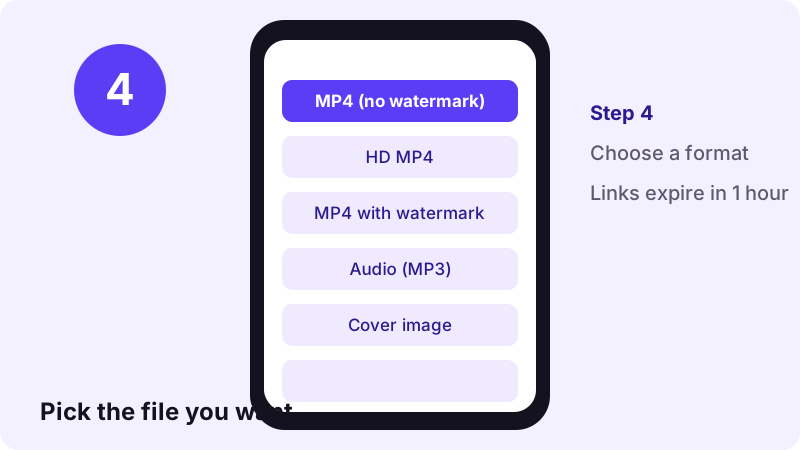
Toltik does not keep the file. The download links it shows expire after one hour, so save the file straight away instead of leaving the tab open for later.
What a TikTok story link looks like
A public story is stored by TikTok as a normal post with its own ID. That is why the link from Share → Copy link works in Toltik in the same way as a regular video link does on our TikTok video downloader.
| Link you copied | Example | Works? |
|---|---|---|
| Story or video link | tiktok.com/@user/video/7… | Yes, while live |
| Short share link | vm.tiktok.com/ZM… or vt.tiktok.com/… | Yes, while live |
| Mobile link | m.tiktok.com/… | Yes, while live |
| Photo story link | tiktok.com/@user/photo/7… | Yes, while live |
| Profile link | tiktok.com/@user | No — no story ID |
Photo stories
Some stories are a still picture or a set of pictures rather than a clip. If the copied link contains /photo/, paste it here or use the TikTok photo downloader to save every image as a JPG.
The 24-hour clock: download TikTok stories in time
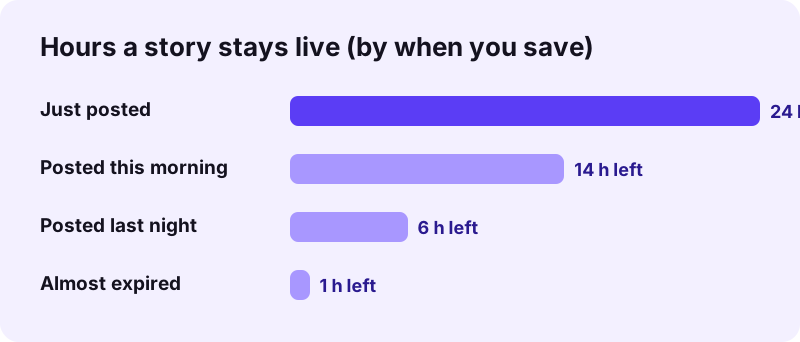
A story is only online for 24 hours from the moment it is posted. Once it expires, TikTok stops serving it to the public, and no web tool can fetch it any more. The earlier you copy the link, the safer you are.
Tips to avoid missing a story
- Copy the link as soon as you decide you want to keep the story.
- Download right after pasting; do not leave the result open for hours.
- If you post stories yourself, save each one the same day you post it.
- Keep a folder for stories so you can find the files later.
File quality and formats
Toltik does not re-encode or upscale anything. You get the files TikTok already stores for that story, which is why quality depends on the original upload.
| File | Format | Typical quality |
|---|---|---|
| MP4 without watermark | H.264 video | Usually 576p–720p |
| HD MP4 | H.264 or H.265 (HEVC) | Often 1080p, when TikTok has it |
| MP4 with watermark | H.264 video | As TikTok serves it |
| Audio | MP3 or M4A/AAC | As TikTok stores it |
| Cover | Image | The story thumbnail |
If you do not see an HD button, the story simply has no HD copy on TikTok's side. A few things decide what quality is available:
- The resolution the creator filmed and uploaded in.
- Whether TikTok kept an extra high-quality version of the upload.
Only need the sound?
If the story uses a song or a voice-over you want to keep, take the audio option. For any regular TikTok post, the TikTok MP3 downloader does the same job with the sound only.
Save TikTok story files on iPhone, Android and computer
The tool runs in any modern browser, so the steps are the same everywhere. Only the place where the file ends up changes.
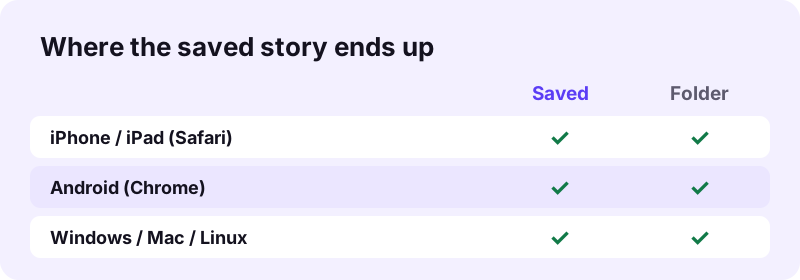
| Device | Browser | Where the file goes |
|---|---|---|
| iPhone / iPad | Safari (iOS 13 or later) | Files app → Downloads |
| Android | Chrome | Downloads folder |
| Windows | Any modern browser | Downloads folder |
| Mac | Safari, Chrome, Firefox | Downloads folder |
| Linux | Any modern browser | Downloads folder |
Move a story to the iPhone Photos app
Open the Files app, go to Downloads, tap the video, then tap Share and choose Save Video. The story now sits in Photos next to your other clips.
HD files that use H.265
Some HD copies use H.265 (HEVC). Recent phones and computers play it without trouble. If an older editor refuses it, use the standard MP4 without watermark instead.
Tiktok story downloader not working? Fixes
Most failures come from one of four causes. Check them in this order before trying again.
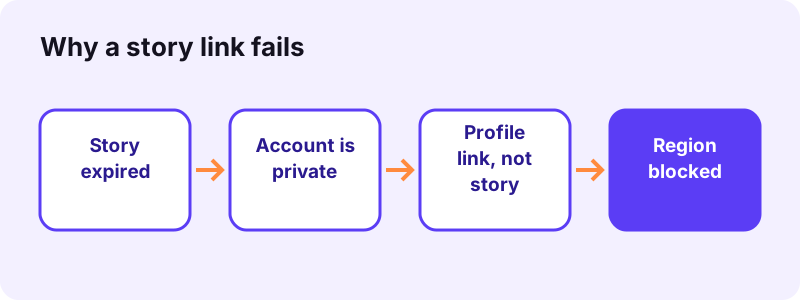
The story has expired
After 24 hours the story is gone from public view. Toltik cannot recover expired stories, and neither can any other tool that honestly reads public posts. If the story is yours, check whether you saved it in the app at the time.
The account is private
Stories from private accounts are only shown to approved followers, so they are not public posts. Toltik does not log in to TikTok and cannot open them. This is by design and will not change.
You copied the profile link instead of the story
A link like tiktok.com/@name points to the whole profile, not to one story. Open the story itself, tap Share inside it, then Copy link. The right link contains /video/ or /photo/ followed by a long number, or is a short vm/vt link.
Other errors
- The story was deleted by its creator before it expired.
- The post is blocked in the region Toltik reads it from.
- Your connection dropped — reload the page and paste the link again.
- The download link is older than one hour — paste the story link again to get a fresh one.
Privacy and respect for creators
Toltik is built for saving your own stories and stories you have permission to keep. A story is short-lived on purpose; the person who posted it chose that. Treat a saved copy with the same care you would want for your own.
What Toltik does with your link
- It reads the public post behind the link and returns the files TikTok serves for it.
- It does not sign in to TikTok and does not use your TikTok account.
- It does not store the videos, and the download links expire after one hour.
- It does not keep a history of the links you paste.
Because Toltik never uses your account, the download is not tied to your profile. That is a side effect of how the tool works, not a feature for watching people quietly. Please do not use it to follow someone who does not want to be followed. More details are on our privacy page.
Fair use of saved stories
- Keep your own stories as a personal archive.
- Ask before reposting a story that someone else made.
- Credit the creator whenever you share their work.
- Delete a copy if the creator asks you to.
Other free Toltik tools
Stories are only one kind of TikTok post. Use the matching tool for the rest: the video downloader for regular clips, the MP3 tool for sounds, and the photo tool for slideshows.
- TikTok video downloader — MP4 without watermark, HD when available.
- TikTok MP3 — the sound of any public post.
- TikTok photo downloader — every image of a slideshow as JPG.
Frequently asked questions
Is this TikTok story downloader free?
Yes. Toltik is free, needs no account or sign-up, and has no limit on the number of stories you save.
Can I download a TikTok story after 24 hours?
No. Once a story expires, TikTok no longer serves it publicly, so Toltik cannot fetch it. Copy the link and download while the story is still live.
Can I save stories from a private account?
No. Stories from private accounts are not public posts. Toltik does not log in to TikTok and cannot open them.
Does the creator get a notification when I save their story?
Toltik does not send anything to TikTok except a read of the public post, and it never uses your account. Even so, please only save stories you own or have permission to keep.
Will the saved story have a watermark?
You choose. Toltik offers an MP4 without watermark and, when TikTok provides it, a version with the watermark too.
Why does my story link not work?
The usual causes are an expired story, a private account, or a profile link copied instead of the story link. Open the story, tap Share inside it and copy the link again.
Can I download only the music from a story?
Yes. Pick the audio option to save the sound as MP3 or M4A, depending on how TikTok stores it.
Do I need the TikTok app to save a story?
No. You can copy the story link from the TikTok website in any browser and paste it here. The download works on phones and computers.
Where do saved stories go on iPhone?
In Safari on iOS 13 or later, files go to the Files app under Downloads. From there you can share the video to Photos.
Does Toltik keep a copy of the stories I download?
No. Toltik does not store videos, and the download links it creates expire after one hour.