How to save a TikTok video without showing up in the creator's activity
- Turn off profile view history. In the TikTok app go to Profile, Menu, Settings and privacy, Privacy, Profile views, and turn Profile view history off. Others then won't see that you viewed their profile.
- Turn off post view history. In Settings and privacy, tap Privacy, then Post views, and turn Post view history off. Your likes and comments will still appear as views, so skip those.
- Don't like, comment on or open their Story. Likes and comments show up for the creator whatever your settings are, and Story viewers can see that you watched even with profile view history off.
- Save the video. Tap Share, then Save video, or press and hold the video and pick Save video. If the option is missing, the creator does not allow downloads.
- Or copy the link and save it with Toltik. Paste the link of a public post into Toltik. Toltik does not log in to TikTok, so it never uses your account to fetch the file.
Does TikTok notify when you save a video? The short answer
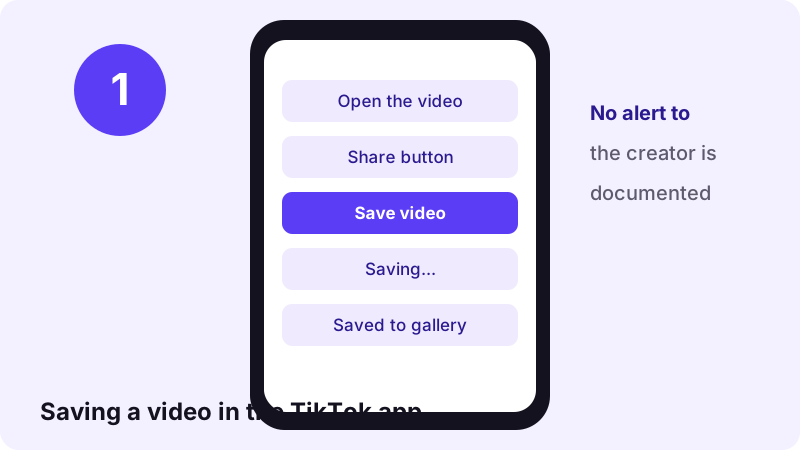
No TikTok Help Center page we read says the creator is told when you save their video. The official page on saving explains what happens: a copy of the file goes to your phone's photo gallery. It mentions a confirmation pop-up for you, and nothing for the creator.
So is the creator told? Based on what TikTok publishes, no individual alert is documented. That is not the same as TikTok promising it never will. Features change, and TikTok can record far more on its own servers than it shows to users.
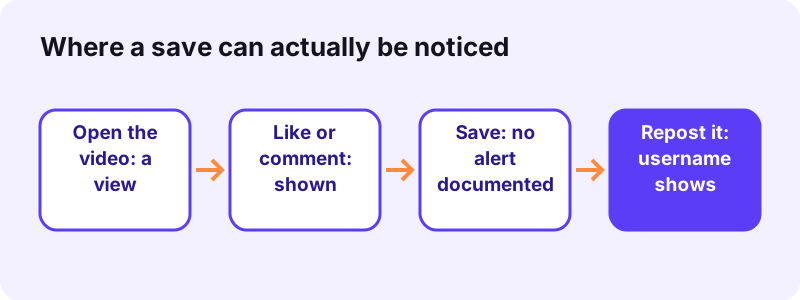
The bigger risk is everything around the save. Visiting a profile, watching a post, liking, commenting and viewing a Story can all be shown to the creator. People who get noticed usually get noticed for one of those, not for tapping Save video.
Many blog posts answer this with "never" or "always". This page only states what TikTok's own Help Center says, and labels everything else as "not documented" or "unclear".
Does TikTok notify the creator? Action by action
The answer depends on what you do. The table lists each common action, whether the creator is notified or can see it, and the TikTok Help Center page behind the answer.
| Action | Notified or visible to the creator? | Source |
|---|---|---|
| Save video (Share → Save video, or press and hold) | No alert documented | How to save TikTok videos to your device |
| Save photo(s) from a photo post | No alert documented | Same page; saving only works if the creator allows downloads |
| Favorite (bookmark) | Unclear: your collection is private, but the inbox has a "Likes and Favorites" filter | Favoriting content on TikTok, Notifications |
| Share or copy the link | No alert documented | No Help Center page we read mentions one |
| Screen recording | No alert documented | No Help Center page we read mentions one |
| Screenshot | No alert documented | No Help Center page we read mentions one |
| Visit their profile | Visible if you both have profile view history on (past 30 days) | Profile view history |
| Watch their post | Visible if you follow them and have post view history on (posts from the last 7 days) | TikTok post view history |
| Like or comment | Visible, whatever your settings | Notifications; TikTok post view history |
| Watch their Story | Visible, even if your account is private | Watching Stories on TikTok |
| Save with the Toltik downloader | Your TikTok account is not used | Toltik reads the public post from its own server |
What happens when you tap Save video
TikTok describes saving as downloading "a copy of the video file directly to your mobile device's photo gallery", so you can watch it offline or share it outside the app. The steps are short, and none of them involves the creator.
Two ways to save in the app
- Standard save: open the video, tap the Share button on the side, then tap Save video. A confirmation pop-up appears when it is in your gallery.
- Quick save: press and hold the video, then pick Save video from the pop-up menu.
Only when the creator allows it
You can only save other people's videos if the creator allows downloads. If the save option is missing, the creator has turned downloading off. Videos marked private cannot be downloaded at all.
The watermark can give you away later
TikTok says saved videos may include the TikTok watermark and the creator's username. The save is silent, but if you post that file on Instagram or in a group chat, the username tells everyone where it came from. Often the creator learns about it that way.
- Saving your own published videos works the same way.
- Drafts can be saved from Profile → Drafts → More → Save to device, without a watermark by default.
- If a saved file is not in your gallery, check the TikTok album; on iPhone, TikTok needs access to Photos.
Saving vs favoriting vs sharing vs screen recording vs screenshots
These five actions are often mixed up, and they are not the same thing. Here is what each one does and what TikTok says about it.
Saving (downloading the file)
A real video file lands in your gallery. It needs the creator's download permission. No creator alert is documented.
Favoriting (the bookmark icon)
Nothing is downloaded. The video goes to your Favorites collection inside the app. TikTok calls it private; the catch is covered in the next section.
Sharing or copying the link
You send a link, not the file. TikTok's downloads page notes that even when a creator blocks downloads, people can still share their content through a link or direct messages. If you share it to the creator by DM, they will of course get your message.
Screen recording
This is a phone feature, not a TikTok button. On iPhone you start it from Control Center; Android has its own screen recorder. No TikTok Help Center page we read mentions an alert for it.
Screenshots
Same situation: a phone feature, and TikTok's Help Center describes no screenshot alert. Some other apps do warn people about screenshots, which is where much of the worry comes from.
- Gives you a file: saving, screen recording, screenshots.
- Stays inside TikTok: favoriting, sharing a link.
- Needs the creator's permission: saving only.
- Has a documented creator-facing trace: none of the five, with favorites as the unclear case.
Do favorites notify the creator?
Favoriting is the bookmark button directly below the comment button. TikTok's page says it saves the post to "your private Favorites collection" and puts it plainly:
“Only you can see the content you have favorited.”
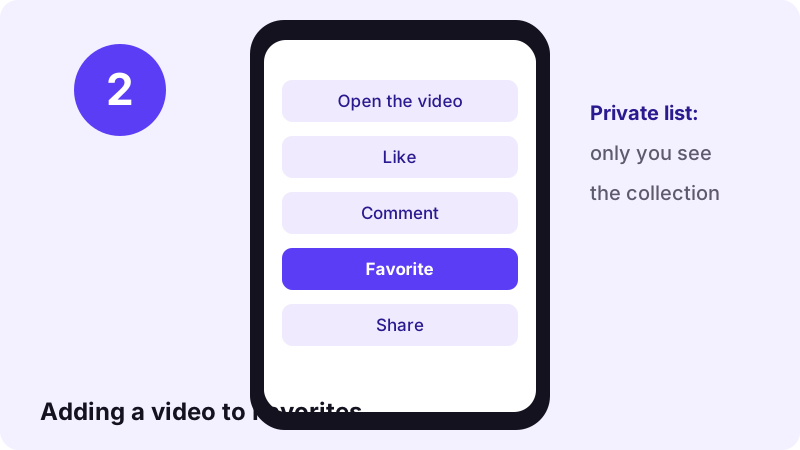
That sentence is about who can browse your collection. The separate Notifications page says the inbox can be filtered by Likes and Favorites. So favorite-related activity does appear in creators' inboxes in some form.
Whether that entry names you, or only counts favorites, TikTok does not say. Because of that gap, treat a favorite as something the creator may see. If you want no trace at all, don't favorite.
Can creators see who saved their video?
This is the real question behind "does TikTok notify". Even without a push alert, could the creator open a list of savers? Here is what we could and could not confirm.
What TikTok Analytics is documented to show
TikTok Analytics, opened from TikTok Studio, gives insights into content performance, audience demographics and engagement trends. TikTok adds that Analytics is not available to everyone, and that data can be delayed by a few days.
Is there a download count?
The Analytics pages we read do not mention a download or save count, and they describe no list of people who saved a post. We could not verify a per-post download figure from an official source, so we won't claim one exists or doesn't. TikTok does not document it.
What creators can control instead
Creators get a switch, not a report. The Video downloads setting decides whether anyone can save their posts in the first place. It is covered step by step further down.
What the creator really can see: 4 actions
These four actions are documented as visible to the other person. They have nothing to do with saving, but people often do them right before or after saving.
1. Visiting their profile
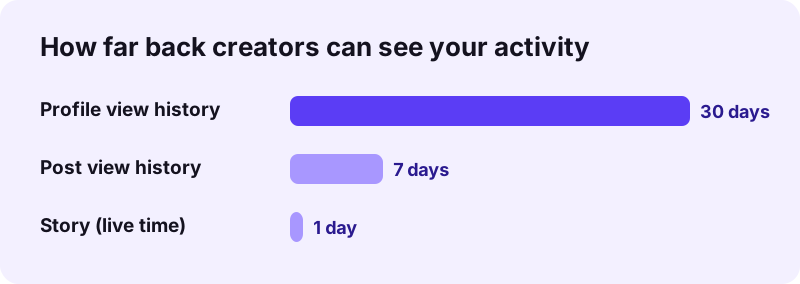
With profile view history on, a creator sees accounts that viewed their profile in the past 30 days, but only accounts that also have the setting on. It is off by default and limited to users aged 16+ with fewer than 5,000 followers.
2. Watching their posts
Post view history shows followers who have the setting on and viewed posts published within the last 7 days. It has the same 16+ and 5,000-follower limits. If you follow someone and open a recent video to save it, the view may show.
3. Liking or commenting
Likes and comments trigger notifications. Post view history also lists people who liked or commented even if they don't follow the creator, and TikTok says this applies "regardless" of their own setting.
4. Watching their Story
Story creators can see the total view count and the accounts that watched. TikTok is explicit that hiding does not work here:
“Keep in mind that people can see you viewed their Story even if your account is private or your profile view history is turned off.”
How to hide your profile visits and post views
Two of the four can be switched off on your side. The trade-off: you stop seeing other people's visits too.
Turn off profile view history
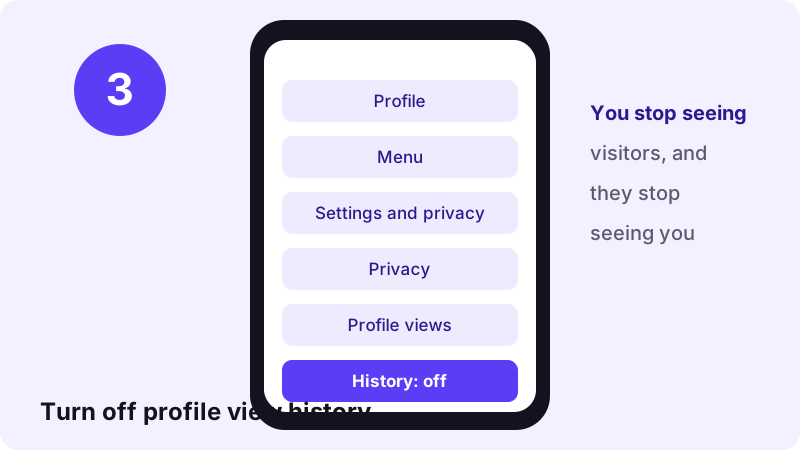
- In the TikTok app, tap Profile at the bottom.
- Tap the Menu ☰ button, then Settings and privacy.
- Tap Privacy, then Profile views.
- Turn Profile view history off.
Turn off post view history
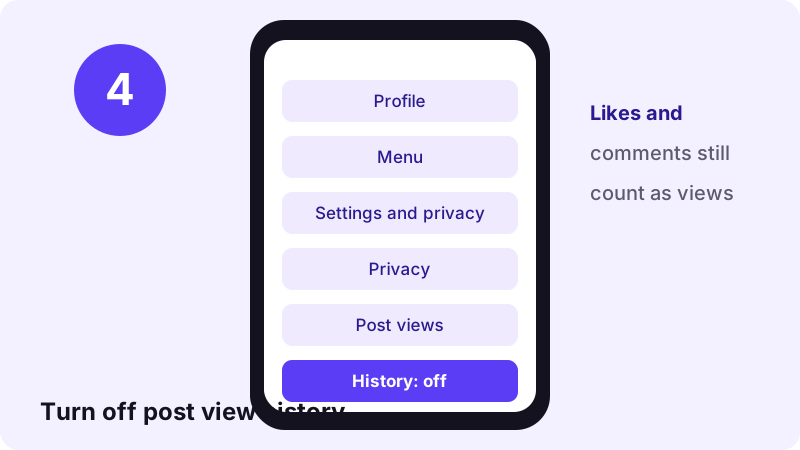
- Open Settings and privacy again.
- Tap Privacy, then Post views.
- Turn Post view history off.
What these settings cannot hide
- Your likes and comments still appear as views to the creator.
- Story views stay visible, even with a private account.
- Messages you send, including a shared link, obviously reach the person.
The creator's side: the Video downloads setting
If you are the creator, TikTok gives you a way to stop saving rather than a way to watch it. That is the answer to "does TikTok notify me when someone saves my video": no alert is documented, but you can block the button.
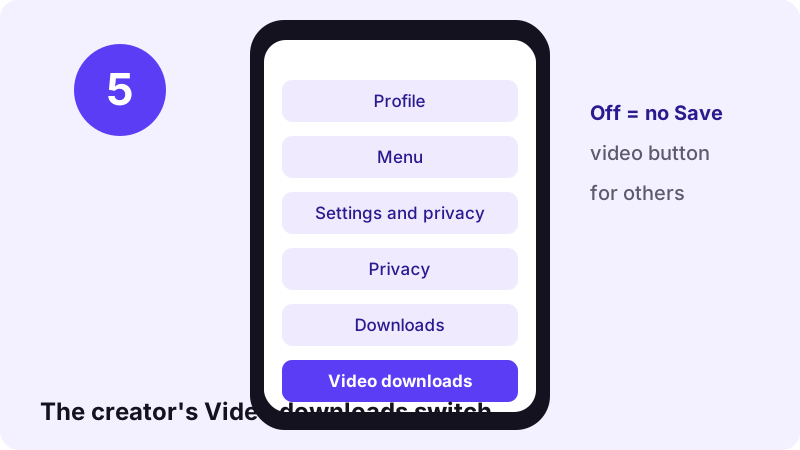
- Tap Profile, then the Menu ☰ button.
- Tap Settings and privacy, then Privacy.
- Tap Downloads and turn Video downloads on or off.
- Off means nobody can download your past or future videos and photos.
- Copies saved while it was on stay on other people's devices.
- Private accounts and users under 16 have it off and cannot turn it on.
- People can still share your posts by link or direct message.
- Some Help Center pages call the switch "Allow video downloads"; the label varies by app version.
Screen recording a TikTok: what to know
When the save button is missing, people often reach for screen recording. TikTok's Help Center describes no recording alert, but the result has limits.
On iPhone and iPad
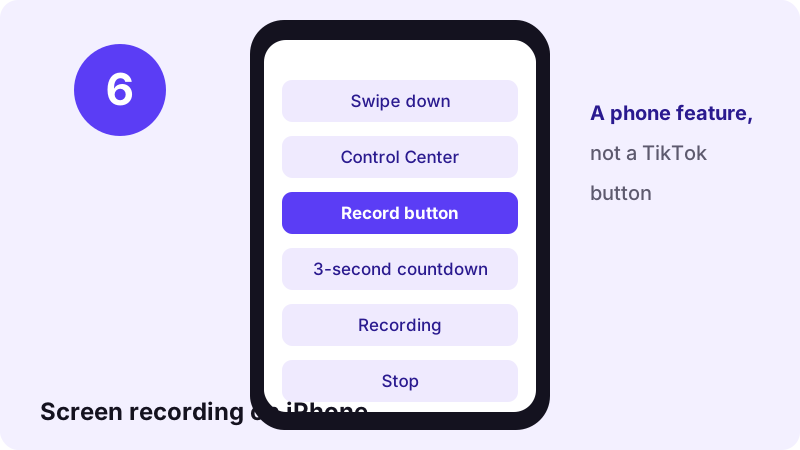
Apple's guide to recording the screen on iPhone uses the Record button in Control Center and a three-second countdown. Apple also notes that "some apps might not allow you to record audio or video".
On Android
Google's Android screenshot and screen recording help covers both features; exact steps depend on the phone maker and Android version.
- A recording is only as sharp as your screen and catches every pop-up.
- If the creator turned downloads off, recording works around their choice. Keep it for personal viewing.
- Reposting a recording carries the same copyright issues as reposting a saved file.
Saving with Toltik instead of the TikTok app
Toltik is a free web tool that saves public TikTok posts as MP4 files without the moving watermark. It does not log in to TikTok, and it never uses your TikTok account. The read of the public post comes from Toltik's server.
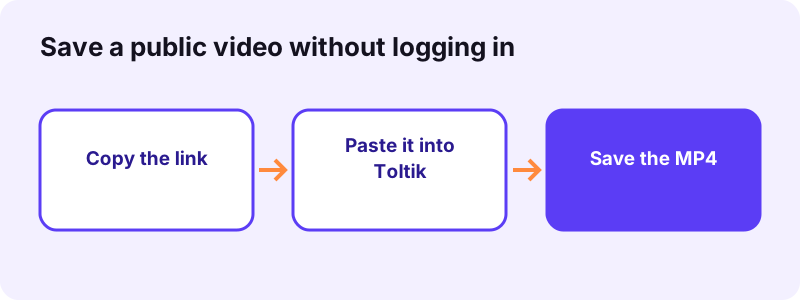
One honest caveat: if you open the video in the TikTok app to copy its link, that is a normal view. If you follow the creator and have post view history on, it can show up. Copying the link from a browser or from a message someone sent you avoids opening it in your account.
We also won't claim TikTok "can't know anything". What TikTok logs on its own servers isn't visible from outside. What we can say is that Toltik sends nothing to TikTok tied to you.
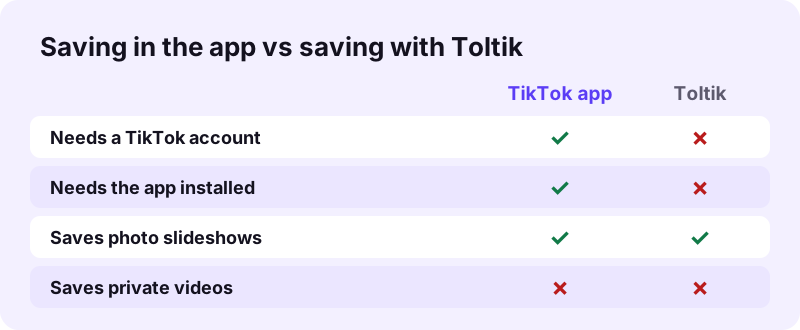
- Only public posts work. Private, deleted and region-blocked videos cannot be saved.
- Photo slideshows: save every slideshow image as JPG.
- Stories: the TikTok story downloader saves a public Story while it is live, with no account involved.
- Just the sound: the TikTok MP3 downloader gives you the audio file.
- Toltik does not store videos, and download links expire after 1 hour.
Myths about TikTok notifications
A lot of what you read about TikTok notify rules is guesswork or out of date. TikTok launched internationally in September 2017 and absorbed Musical.ly that year, per Wikipedia, and its features have changed many times since. Here is how common claims compare with today's Help Center.
- "The creator gets a notification for every save." Not documented anywhere we read.
- "Favorites are 100% invisible." Your collection is private, but the inbox has a Likes and Favorites filter. Unclear.
- "Turning off profile view history hides everything." No: Story views, likes and comments stay visible.
- "A private account hides your Story views." No, TikTok says the opposite.
- "Creators can see a list of who downloaded." TikTok does not document such a list.
Save responsibly: notified or not
Whether TikTok notifies anyone is a different question from whether you may reuse the video. Save your own videos, or videos you have permission to use. If the creator switched downloads off, respect that choice. Go back to the TikTok downloader home page for the full list of what Toltik can save.
- Don't re-upload someone else's video as your own.
- Credit the creator and ask first before posting it elsewhere.
- Don't save videos to track, expose or harass someone.
- For commercial use, get the rights holder's permission.
Frequently asked questions
Does TikTok notify when you save a video?
No TikTok Help Center page we read says the creator is notified. TikTok's page on saving only mentions a confirmation pop-up for you.
Does TikTok notify someone when you favorite their video?
TikTok says only you can see your Favorites collection, but creators' inbox can be filtered by Likes and Favorites. Whether you are named is not documented, so treat it as possibly visible.
Does TikTok notify when you screen record or screenshot?
No TikTok Help Center page we read describes a screen-recording or screenshot alert. Both are phone features, not TikTok buttons.
Does TikTok notify when you share a video?
No alert for sharing a link is documented. If you send it to the creator by direct message, they get your message as usual.
Can a creator see who downloaded their video?
TikTok does not document a list of people who saved a post, and the Analytics pages we read mention no download count. Creators can switch Video downloads off instead.
Can people see that I watched their TikTok?
Sometimes. If you follow them and have post view history on, views of posts from the last 7 days can show. Likes and comments show whatever your settings.
Can people see that I visited their profile?
Only if you both have profile view history on. Visits from the past 30 days are shown. Turning the setting off hides your visits.
Can people see that I viewed their Story?
Yes. TikTok says people can see you viewed their Story even if your account is private or your profile view history is off.
Why is there no Save video button?
The creator does not allow downloads. Private accounts and users under 16 have downloads off and cannot turn them on.
Does saving with Toltik notify the creator?
Toltik never uses your TikTok account; it reads the public post from its own server. Opening the video in your app to copy the link is still a normal view.
Guides
Video — Save TikTok videos as MP4 without watermark, in HD.
- Looking for a SnapTik Alternative? Try Toltik
- SSSTik.io Alternatives: A Free Way to Save TikToks
- How to Save a TikTok Draft Without Posting It
- How to Download TikTok Videos on iPhone
- TikTok Video Not Downloading? How to Fix It
- How to Download TikTok Videos on PC and Mac
- How to Download Private TikTok Videos (What Really Works)
Sources
- How to save TikTok videos to your device — TikTok Help Center
- Manage video downloads — TikTok Help Center
- Favoriting content on TikTok — TikTok Help Center
- Notifications — TikTok Help Center
- Profile view history — TikTok Help Center
- TikTok post view history — TikTok Help Center
- Watching Stories on TikTok — TikTok Help Center
- TikTok Stories — TikTok Help Center
- How to use TikTok Analytics — TikTok Help Center
- TikTok — Wikipedia