How to get a copy of a private TikTok video the right way
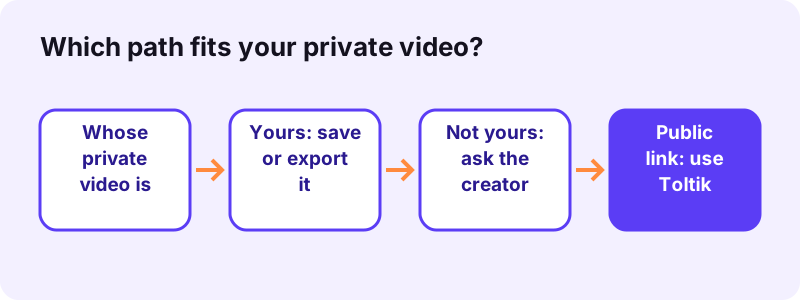
- Check whose video it is. If the private post is yours, you can save it from your own account. If it belongs to someone else, only the creator can give you a copy.
- Your own post: save or export it. Turn on Save to device before posting, or request your file with Settings and privacy → Account → Download your data.
- Someone else's post: ask the creator. Message the creator and ask them to send you the file, or to switch the post to Everyone for a moment.
- Once the post is public, use Toltik. Copy the link with Share → Copy link, paste it into the Toltik box on the home page and tap Download.
Can you download private TikTok videos? The short answer
It depends on one thing: whose video it is. If the private post is yours, yes, you can keep a copy. If it belongs to someone else, no website, app or browser trick can legitimately pull it out of TikTok.
- Your own private TikTok videos: save them before posting, change the audience for a moment, or request your data from TikTok.
- Someone else's private post: only the creator can send you the file or make it public.
- A follower of a private account: you can watch, but TikTok does not let you download.
- Sites that say they unlock private videos: treat them as scams.
Toltik is no exception. Our free TikTok downloader reads only posts that TikTok shows to anyone, without a login. Private, Friends-only and deleted posts return an error, and that is by design.
What "private" means on TikTok
TikTok has two separate privacy switches, and people often mix them up. One works on the whole account. The other works on each post. Both can make a video private.
A private account
With a private account, the owner approves who can follow them and who can watch their videos, LIVE videos, bio and likes. Everyone else sees the name, username and photo, but not the posts.
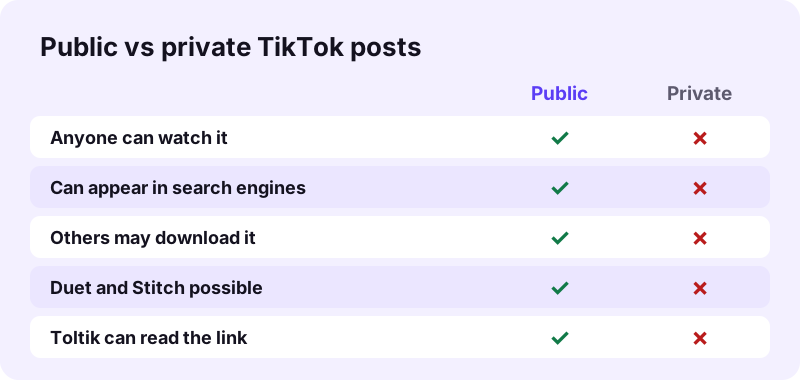
“Keep in mind that if your account is private, people won't be able to Duet, Stitch, create stickers with, or download your posts.”
A private post on any account
Even on a public account, every post has its own audience. TikTok lets the creator pick Everyone, Friends (followers they follow back) or Only you. On a private account the choices are Followers, Friends or Only you.
What an approved follower can and cannot do
- Watch the posts the owner shares with followers.
- See the account's followers and following lists.
- Not download the posts, Duet or Stitch with them.
- Not add those posts to their own Stories.
Wikipedia sums up the effect well: the content is still on TikTok's servers, but it is closed to everyone the owner has not approved.
“Private content remains visible to TikTok but is blocked from TikTok users who the account holder has not authorized to view their content.”
Why no downloader can open someone else's private posts
A web downloader is not magic. It asks TikTok for a post the same way a logged-out visitor would, then hands you the files TikTok sends back. If TikTok refuses to show the post to a stranger, it refuses the downloader too.
What a tool like Toltik can actually see
- Public videos, with or without the watermark.
- The HD copy, when TikTok stores one.
- The sound of a public post.
- Photo slideshows and public stories.
Where the "private viewer" promise falls apart
To reach private TikTok videos, a site would need an account that the owner approved, or it would have to break into TikTok. The first means you hand over your login. The second is illegal. Either way, an honest service will not offer it.
If you can't watch a post in TikTok while logged out, assume no public tool can download it. That one test saves a lot of time.
Red flags: how fake private TikTok downloaders work
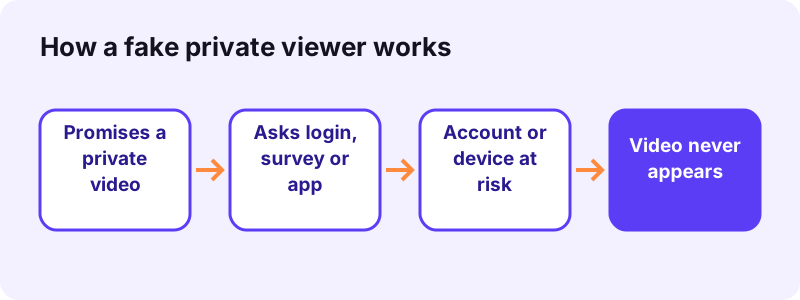
Search for a way to watch private TikTok videos and you will find pages that promise exactly that. We will not name them, but they follow the same few patterns. Learn the patterns and you can spot any of them.
Red flag 1: it asks for your TikTok login
No downloader needs your password. A page that asks you to "log in with TikTok" on its own form is collecting credentials. Apple's security advice puts it plainly:
“Never share personal data or security information like passwords or security codes, and never agree to enter them into a webpage that someone directs you to.”
Red flag 2: "verify you are human" with surveys or offers
A fake progress bar runs, then the page says the video is ready once you finish a survey, sign up for an offer or enter your phone number. The video never arrives. The site earns money from your sign-up.
Red flag 3: it wants you to install something
An APK file, a browser extension or a "viewer" app from outside the official stores is a classic way to spread malware. On Android, Google Play Protect checks the device for potentially harmful apps from other sources, but the safest install is the one you never make.
Red flag 4: it asks you to pay to unlock
Paying does not change what TikTok shows. A fee to unlock private TikTok videos buys nothing but a second problem: your card details are now on a dishonest site.
Red flag 5: a blurred preview or a fake thumbnail
Some pages show a blurred frame or the account's profile photo to look convincing. The name and photo of a private account are public on TikTok anyway, so that preview proves nothing.
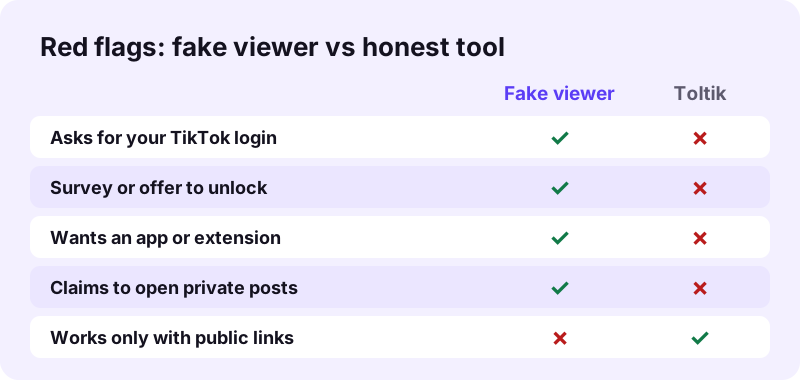
- Close any page that asks for your TikTok password.
- Never complete a survey to "unlock" a download.
- Install apps only from the App Store or Google Play.
- Do not paste commands a website tells you to run.
- Keep 2-step verification on your TikTok account.
How to save your own private TikTok videos
This is where the good news is. If the private TikTok videos are yours, you have three solid options. None of them needs a third-party site to see your account.
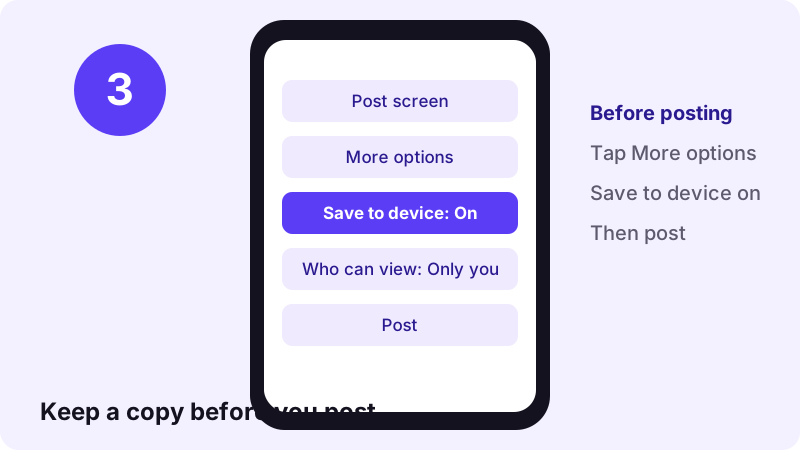
Option 1: turn on Save to device before posting
TikTok's Help Center recommends downloading your videos before you post. On the Post screen, tap More options and turn Save to device on. The clip lands on your phone even if you post it as Only you.
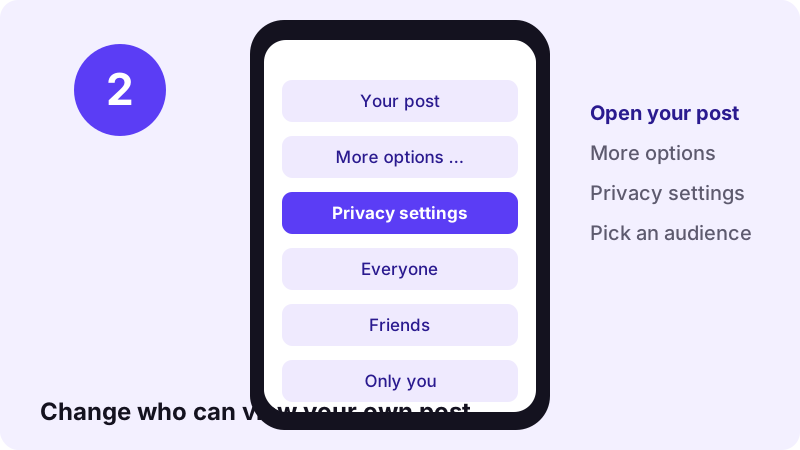
Option 2: switch the post to Everyone for a moment
Open your post, tap More options …, then Privacy settings, and choose Everyone. Copy the link and paste it into the TikTok video downloader to get the MP4 without the watermark. Then set the post back to Only you.
TikTok notes that the view count does not reset when you change these settings. Keep in mind that while the post is set to Everyone, anyone can see it, so keep that window short.
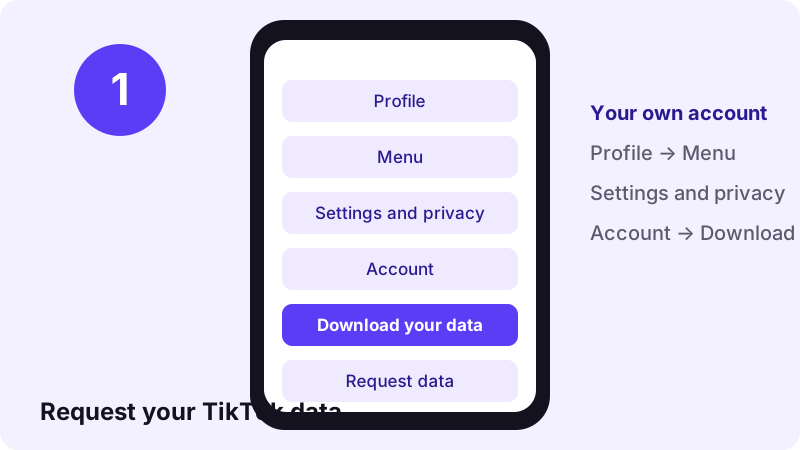
Option 3: request your data from TikTok
- In the TikTok app, tap Profile.
- Tap the Menu button, then Settings and privacy.
- Tap Account, then Download your data.
- Choose what to include and a file format, then tap Request data.
- When TikTok notifies you, come back and tap Download.
What the Download your data file contains
TikTok describes the file as a copy of your data that "may include but is not limited to" your username, watch history, comment history and privacy settings. It does not promise every video file, so check what you get.
“Some data may not be available to download, such as data that affects the privacy of others.”
| Point | What TikTok says |
|---|---|
| Where | Settings and privacy → Account → Download your data |
| Preparation | It may take a few days to prepare the file |
| Notice | TikTok notifies you in the app when it is ready |
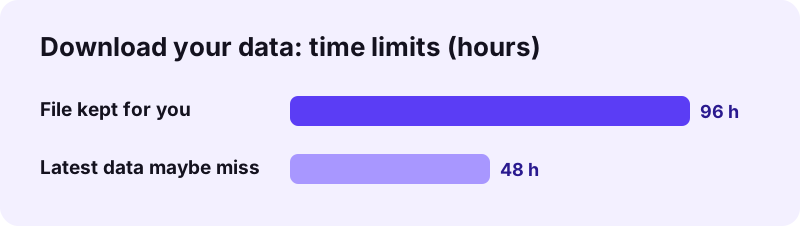
| How long it stays | Up to 4 days |
| Recent activity | The last 24 to 48 hours of some data may be missing |
| Data transfer | In the EEA and UK, posts can be sent to a third-party service you authorize |
Our honest advice: for videos you care about, use Option 1 or 2. The data export is best as a backup of your account history, and we could not confirm from TikTok's pages that it always contains your original video files.
Someone else's private video: what you can do
When private TikTok videos belong to a friend, a relative or a creator you follow, the only real key is their permission. The good news is that asking usually works.
Ask the creator to send you the file
The creator can save their own post and send it to you by message, email or a cloud link. You get the original, and they decide who has it.
- Say which video you mean, with its date or a short description.
- Explain why you want it, for example a family memory or a school project.
- Promise to keep it private and not to repost it.
- Offer to delete it whenever they ask.
Ask them to make the post public
If they are happy to share it more widely, they can set the post to Everyone. Then you can copy the link and save it with the Toltik downloader, or keep just the audio with TikTok MP3.
If you follow a private account
Being an approved follower lets you watch, not keep. TikTok's own Save video button will not appear, because, in TikTok's words for any post:
“If you don't have the option to save a video, this means the creator doesn't allow it.”
What about a screen recording? It copies your screen, not the file. Technically it may work, but the owner chose a private audience, so recording and sharing it goes against that choice. TikTok's pages we read do not say whether a recording is detected, so do not count on it either way.
Privacy, copyright and private posts
A private post is a clear signal: the creator did not want it widely shared. Copyright law points the same way. When the U.S. Copyright Office explains fair use, it singles out works that were never published:
“In addition, use of an unpublished work is less likely to be considered fair.”
- Save your own posts freely: they are yours.
- Copy someone else's private post only with their permission.
- Never repost a private video to a public place.
- Credit the creator whenever you share their work.
- Delete copies the creator asks you to remove.
Rules differ by country and this is not legal advice. If you own a video and someone misused it, read our DMCA page.
Gave your login to a private viewer site? Do this now
If you typed your TikTok password into one of these pages, act quickly. TikTok's Account safety page lists the tools to lock your account back down.
- Change your TikTok password to a new, unique one.
- Turn on 2-step verification in Settings and privacy → Security & permissions.
- Open Manage devices and delete any device you do not recognize.
- Consider adding a passkey, which TikTok calls more secure than a password.
- If you installed an app or extension from that site, remove it and run a security scan.
TikTok's own page lists phishing scams and malware among the reasons a password can leak. That is exactly what most fake private viewers are built for.
What Toltik can download for you
Toltik is built for public content and is honest about it. Paste a public link and you get the original files TikTok serves, without the account, the app or the watermark.
| Content | Toltik | Where |
|---|---|---|
| Public video, no watermark | Yes | TikTok downloader |
| Sound of a public post | Yes | TikTok MP3 |
| Public story, while it is live | Yes | Story downloader |
| Private, Friends-only or Only you post | No | Ask the creator |
| Your own private post | No (switch it to Everyone first) | Your account |
The story downloader follows the same rule: it saves public stories only, never stories shared with a private audience.
Frequently asked questions
Can I download private TikTok videos from someone else's account?
No. TikTok blocks private posts from anyone the owner has not approved, and even approved followers cannot download them. Ask the creator to send you the file or make it public.
Can Toltik download private posts?
No. Toltik only reads public posts. Private, Friends-only, Only you and deleted posts cannot be downloaded.
How do I download my own private TikTok videos?
Turn on Save to device before posting, switch the post to Everyone for a moment and use the Toltik downloader, or request your file in Settings and privacy → Account → Download your data.
Are private TikTok viewer sites safe?
No. Sites that claim to open private posts usually want your TikTok login, a survey sign-up, an app install or a payment. None of them can show a post TikTok keeps private.
Can followers of a private account download videos?
No. TikTok says that if an account is private, people won't be able to Duet, Stitch, create stickers with, or download its posts.
How long does Download your data take?
TikTok says it may take a few days to prepare the file. You get a notification in the app, and the file stays available for up to 4 days.
Does Download your data include my videos?
TikTok says the file may include, but is not limited to, your username, watch history, comment history and privacy settings. It does not promise every video, so save important clips with Save to device.
Will the view count reset if I make my post public for a moment?
No. TikTok's Help Center says the view count reflects all views to date and does not reset when you change the privacy settings.
I entered my TikTok password on a private viewer site. What now?
Change your password, turn on 2-step verification, check Manage devices for unknown logins and remove any app the site made you install.
Is it legal to save a private video someone sent me?
If the creator sent it to you, keeping it for yourself is normally fine. Do not repost it without their permission. Rules vary by country and this is not legal advice.
Guides
Video — Save TikTok videos as MP4 without watermark, in HD.
- Looking for a SnapTik Alternative? Try Toltik
- SSSTik.io Alternatives: A Free Way to Save TikToks
- Does TikTok notify when you save a video?
- How to Save a TikTok Draft Without Posting It
- How to Download TikTok Videos on iPhone
- TikTok Video Not Downloading? How to Fix It
- How to Download TikTok Videos on PC and Mac
Sources
- Choosing between a private or public account — TikTok Help Center — TikTok
- Post privacy settings — TikTok Help Center — TikTok
- Requesting your data — TikTok Help Center — TikTok
- Download content — TikTok Help Center — TikTok
- Account safety — TikTok Help Center — TikTok
- More Information on Fair Use — U.S. Copyright Office
- Recognize and avoid social engineering schemes — Apple Support
- Use Google Play Protect to help keep your apps safe — Google
- Malware: How To Protect Against, Detect, and Remove It — Federal Trade Commission
- TikTok — Wikipedia