Save a TikTok video on iPhone with Safari
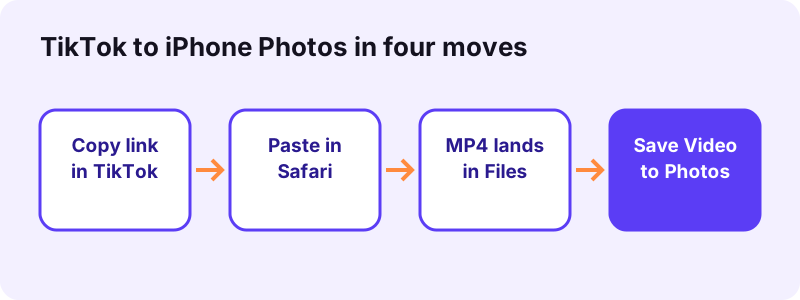
- Copy the TikTok link. In the TikTok app, open the video, tap Share, then tap Copy link.
- Paste it into Toltik in Safari. Open Safari, go to toltik.com, tap the box, tap Paste, then tap Download.
- Save the MP4. Tap the MP4 without watermark or the HD MP4 and confirm the download. Safari saves it in the Downloads folder.
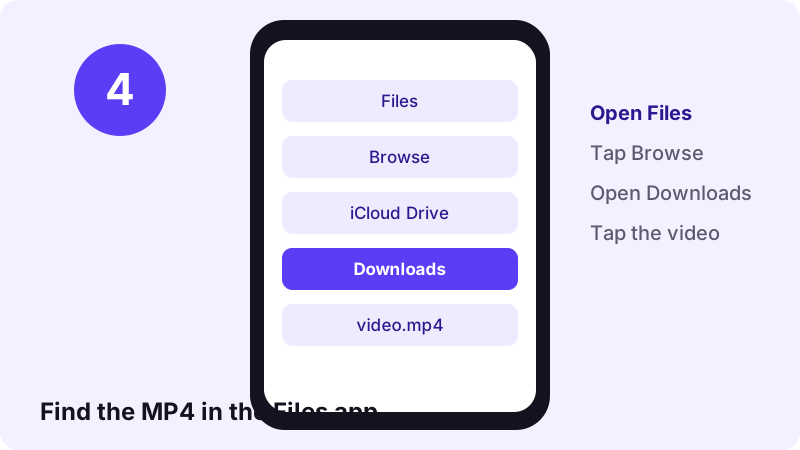
- Open it in Files. Open the Files app, tap Browse, then Downloads. If you do not see it, tap iCloud Drive first.
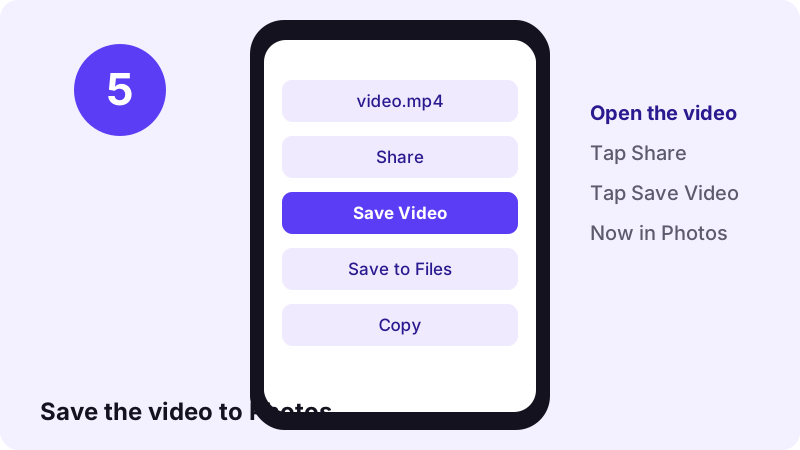
- Move it to Photos. Open the video, tap the Share button and choose Save Video to add it to your Photos library.
What you need before you start
The short answer: Safari, the Files app and a link. You do not need a paid app, a jailbreak or a TikTok account. Toltik, the free TikTok downloader, runs inside Safari and hands you the files TikTok already stores for a public post.
Checklist before you start
- An iPhone or iPad with Safari, which is built in.
- The Files app, also built in. Can't spot it? Swipe down on the Home Screen and search for Files.
- The TikTok app or tiktok.com, only to copy the link.
- A public post. Private videos, drafts and deleted posts cannot be saved.
Safari on iOS has had a download manager since iOS 13, so any iPhone that is still getting updates can do this. Toltik read each link in 0.6 to 1.8 seconds in our tests on four real posts (9 of 9 runs worked).
How to download TikTok videos on iPhone with Safari, step by step
Here is the full method to download TikTok videos on iPhone without an app. It takes about a minute the first time and a few seconds after that.
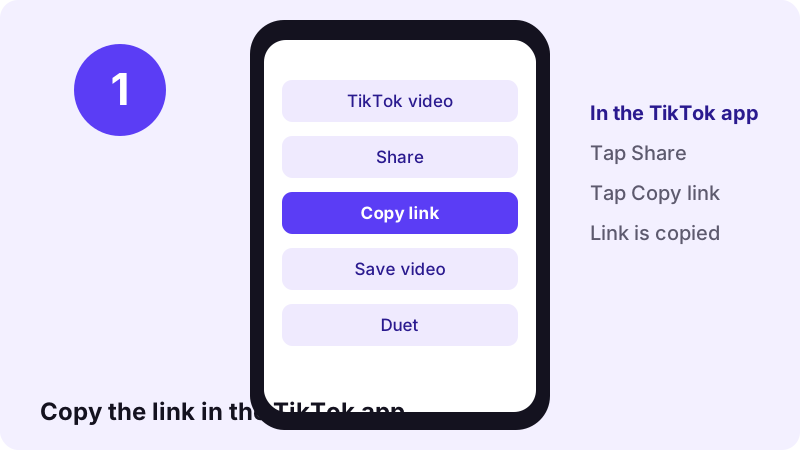
Step 1: copy the video link in TikTok
Open the video in the TikTok app. Tap the Share arrow on the right side of the screen, then tap Copy link. Nothing visible happens, but the link is now on your clipboard.
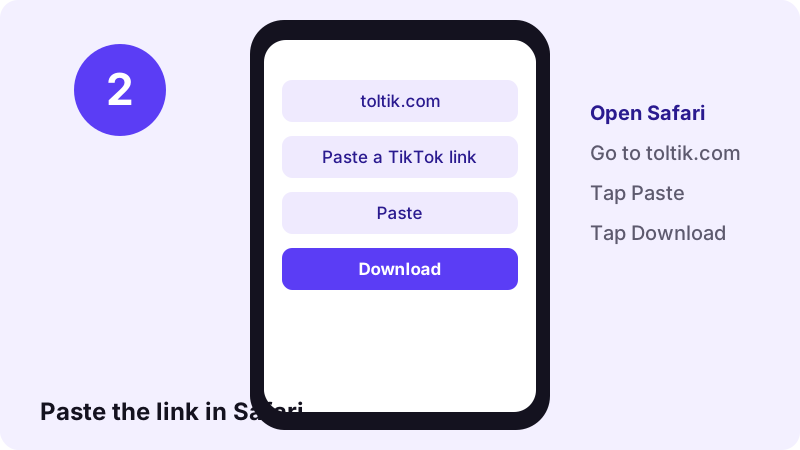
Step 2: paste the link into Toltik in Safari
Open Safari and go to toltik.com, or use the box at the top of this page. Tap the box, tap Paste, then tap Download.
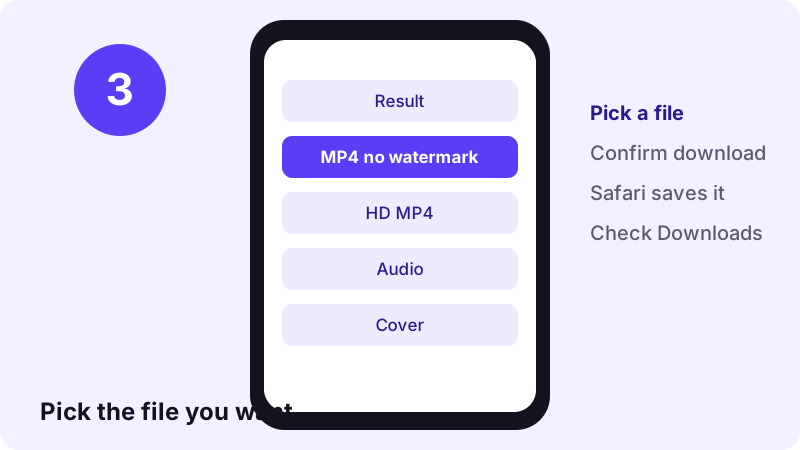
Step 3: choose the MP4 and confirm
The result lists every file the post has. Tap MP4 without watermark for the version that plays everywhere, or HD MP4 for the sharpest copy. When Safari asks, confirm the download.
Step 4: open the Downloads folder in Files
Safari does not put the video in Photos. It saves it in the Files app. Open Files, tap Browse, then tap Downloads. You can also tap the Downloads button next to Safari's search field to see recent downloads.
“Tip: If you don’t see the Downloads folder on the Browse screen, tap iCloud Drive.”
Move the TikTok video from Files to Photos
A video in Files will not appear in your camera roll, in Instagram's picker or in most editing apps until you copy it to Photos. That copy takes three taps.
- In Files, tap the MP4 to open it.
- Tap the Share button (the square with an arrow).
- Tap Save Video. The clip is now in your Photos library.
Why Save Video is the right button
Save Video is the same share-sheet action Apple describes for saving a shared video into your own library: tap Share, then Save Image or Save Video (Apple Support, Shared Albums). After that you can delete the copy in Files to free space.
Save Video is missing from the share sheet
- Scroll down the list of actions: the share sheet shows more options than fit on screen.
- Make sure the file name ends in
.mp4. An audio file (M4A or MP3) cannot go into Photos. - If the file is still downloading, wait until the progress circle in Safari's Downloads list is gone.
Change where Safari saves your TikTok downloads
By default Safari puts downloads in the Downloads folder in iCloud Drive. That uses iCloud storage and needs a connection to sync. If your iCloud is full, saving to the phone itself is often the better choice.
“On My iPhone: Select this option to save downloads to the Downloads folder on your iPhone.”
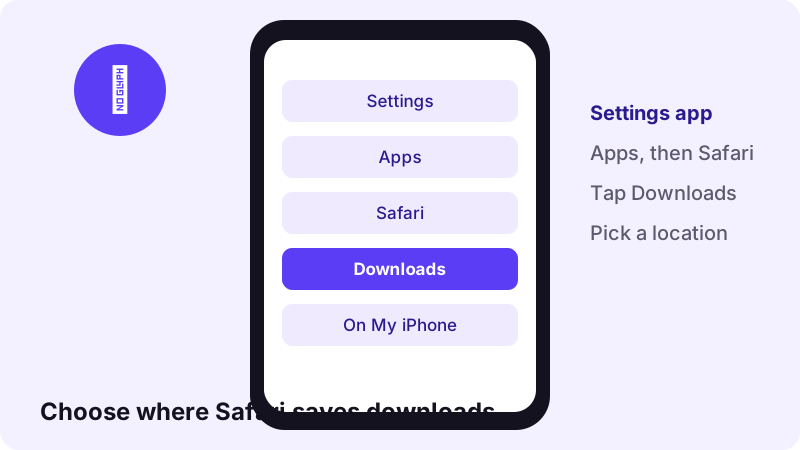
The three download locations
| Setting | Where the MP4 goes | Good for |
|---|---|---|
| iCloud Drive | Downloads folder in iCloud Drive | Opening the clip on your iPad or Mac too |
| On My iPhone | Downloads folder on the iPhone | Full iCloud storage or no signal |
| Other | A folder you pick | Keeping TikToks in their own folder |
Changing this setting only affects new downloads. Files you already saved stay where they are.
TikTok's own Save video button on iPhone
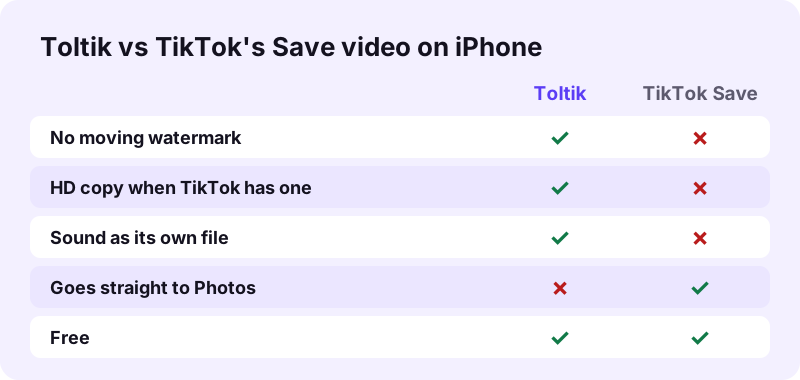
The TikTok app has its own way to save: tap Share, then Save video. It goes straight to Photos, which is handy. The catch is that the file carries TikTok's moving logo and the creator's username.
When the Save video button is missing
Creators can turn off downloads of their videos in the app's privacy settings. When they do, the Save video option does not show up for their posts. The exact menu names change between TikTok versions, so check the app itself for the current wording.
A missing button is the creator's choice. Respect it: keep their video for personal viewing only, or message them and ask for the file.
Which route should you use?
- Want it in Photos in one tap and do not mind the logo? Use TikTok's Save video.
- Want a clean file to edit your own clip? Use the TikTok downloader without watermark.
- Want the HD copy or only the sound? Only Toltik gives those as separate files.
Saving with or without the watermark
From one public link, Toltik offers up to three video files. Pick the one that fits what you plan to do with it.
| File | Watermark | Codec | Best for |
|---|---|---|---|
| MP4 without watermark | No | H.264 | Plays in every iPhone app and editor |
| HD MP4 | No | Often H.265 (HEVC) | Sharpest picture, often 1080p |
| MP4 with watermark | Yes | H.264 | Sharing with the TikTok credit visible |
When to keep the watermark
The watermark shows the creator's name. If you send someone else's clip to a friend, the stamped version keeps the credit attached. For your own videos, the clean MP4 is usually what you want.
HD and H.265 playback on iPhone
The HD MP4 often uses H.265, also called HEVC. In our tests the HD files were H.265 while the standard files were H.264. Apple builds HEVC support into iOS 11 and later, so any recent iPhone plays these files in Photos and Files.
“HEIF and HEVC offer better compression than JPEG and H.264, so they use less storage space on your devices and iCloud Photos, while preserving the same visual quality.”
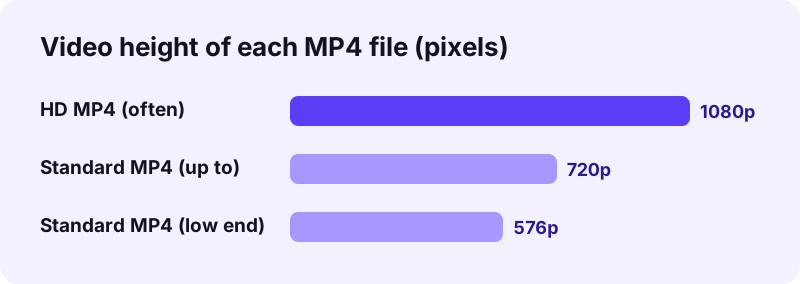
Which iPhones decode HEVC in hardware?
Hardware HEVC decoding arrived with the Apple A9 chip in the iPhone 6s and was switched on with iOS 11 in 2017 (Wikipedia, HEVC). Apple notes that on some older devices, 1080p or lower at 60 fps or lower is the most compatible.
If the HD file will not play or edit
- Use the standard MP4 without watermark: H.264 opens almost everywhere.
- Some third-party editors and older Windows PCs cannot open H.265. Send them the H.264 file.
- The HD copy is not always bigger: H.265 compresses better, so it can be smaller.
Save TikTok sounds and photo slideshows on iPhone
Videos are only part of TikTok. The same link-and-paste method saves the sound of a post and every picture of a photo slideshow.
Save only the sound
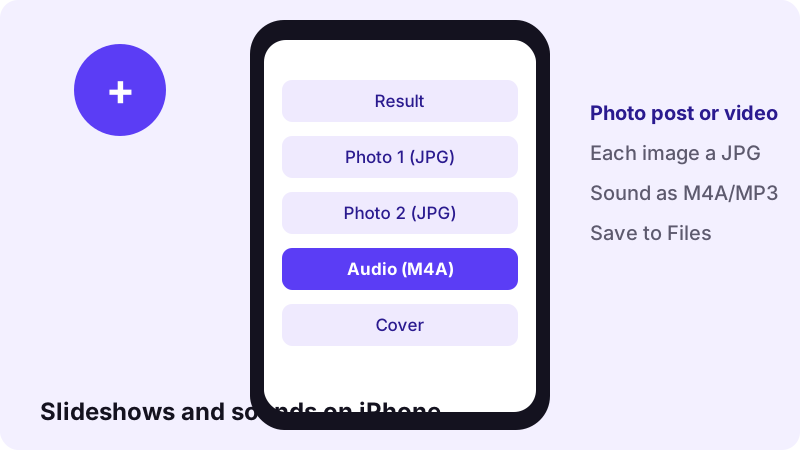
Use the TikTok MP3 page to save the audio. The file is M4A or MP3, as TikTok stores it: a 15-second sound came out at 0.25 MB as M4A in our test. Audio lands in Files, not Photos, and plays in the Files preview.
Save every picture of a slideshow
Paste a photo-post link into the TikTok photo downloader. Each picture is offered as its own JPG. Open one in Files, tap Share, then Save Image to put it in Photos.
- Sounds: M4A or MP3, saved to Files.
- Slideshow pictures: one JPG each, at original size.
- Cover image: a JPG of the video thumbnail.
iPad, other browsers and Shortcuts
On iPad
The steps are the same on iPad: Safari saves the file, and Apple's download help covers both iPhone and iPad. Look in Files, under Downloads.
Chrome or Firefox on iPhone
We wrote this guide around Safari because Apple documents where its downloads go. Other browsers on iPhone handle downloads in their own way, so if a file does not appear, open the same page in Safari.
Do you need an iOS Shortcut?
No. Apple's Shortcuts app lets you chain actions together, and some people build download shortcuts with it. A shortcut is not needed here, and we suggest you avoid installing shared shortcuts from sources you do not trust.
Troubleshooting TikTok downloads on iPhone
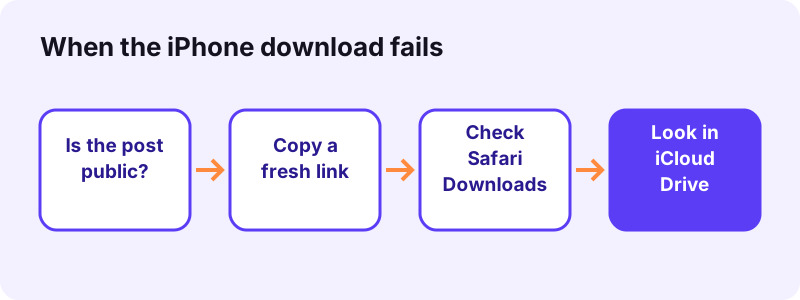
Most problems are about where the file went, not about the download itself. Work through these checks in order.
The download does not start
- Open the post in TikTok and check it is still online and public.
- Copy a fresh link with Share, then Copy link.
- Paste it again and tap Download. Download links expire after 1 hour.
- Check your connection, then try once more.
The video is not in Photos
That is normal. Safari saves to Files, not Photos. Open Files, Browse, Downloads, then use Share and Save Video, as shown above.
I cannot find the Downloads folder
Tap iCloud Drive on the Browse screen: the Downloads folder lives there by default. If you changed the setting to On My iPhone, look under On My iPhone instead.
| What you see | Likely cause | What to do |
|---|---|---|
| We could not read that post | The post is private, deleted or region-blocked | Only public posts work. Ask the creator for the file. |
| Download link stopped working | Links expire after 1 hour | Paste the TikTok link again. |
| File stuck in Safari's Downloads list | Weak connection or full iCloud | Switch to On My iPhone in Settings, then retry. |
| Save Video is missing | The file is audio, or still downloading | Wait for the download, check it is an MP4. |
| Video plays without sound | TikTok muted the sound, or the phone is on silent | Check the ring switch and volume. |
Respect the creators you save from
Being able to save a TikTok on your iPhone does not make the video yours. The creator still owns it, whatever app or site you used to save it.
“Fair use is a legal doctrine that promotes freedom of expression by permitting the unlicensed use of copyright-protected works in certain circumstances.”
- Save your own videos freely, for backups or editing.
- Keep other people's videos for personal viewing unless they say otherwise.
- Ask before you repost, remix or use a clip in your own content.
- Credit the creator by name whenever you share.
- Never sell or claim someone else's video as your own.
Toltik is independent and not affiliated with TikTok. Copyright rules differ by country and this is not legal advice. Owners can report misuse on our DMCA page.
Quick recap
To download TikTok videos on iPhone, remember five moves:
- TikTok: Share, Copy link.
- Safari: paste it into Toltik and tap Download.
- Pick the MP4 without watermark or the HD MP4.
- Files: Browse, Downloads (inside iCloud Drive by default).
- Share, Save Video: the clip is now in Photos.
Bookmark this page in Safari, and the next TikTok you want to keep is a few seconds away.
Frequently asked questions
How do I download TikTok videos on iPhone without an app?
Copy the link in TikTok (Share, Copy link), paste it into Toltik in Safari and tap Download. Safari saves the MP4 in the Files app, in Downloads.
Where do downloaded TikTok videos go on iPhone?
Safari saves them in the Files app, in the Downloads folder. By default that folder is inside iCloud Drive. You can change this in Settings, Apps, Safari, Downloads.
How do I move a TikTok video from Files to Photos?
Open the MP4 in Files, tap the Share button, then tap Save Video. The clip is then in your Photos library.
Can I save TikTok videos on iPhone without the watermark?
Yes. Toltik offers an MP4 without the moving watermark, and an HD MP4 when TikTok stores one. TikTok's own Save video button always adds the watermark.
Why is there no Save video button on some TikToks?
Creators can turn off downloads for their videos in TikTok's privacy settings. Respect that choice: keep the video for personal viewing or ask the creator.
Will the HD TikTok file play on my iPhone?
Yes on any recent iPhone. The HD file often uses H.265 (HEVC), which iOS supports since iOS 11. If an editing app cannot open it, use the standard H.264 MP4.
Can I save just the sound of a TikTok on iPhone?
Yes. Use the TikTok MP3 page. The audio is saved as M4A or MP3 in the Files app.
Can I download TikTok photo slideshows on iPhone?
Yes. Paste the photo-post link into the photo downloader and save each picture as a JPG, then use Save Image to add it to Photos.
Can I download private TikTok videos on iPhone?
No. Toltik only works with public posts. Private, deleted and region-blocked videos cannot be downloaded.
Does it work on iPad too?
Yes. The steps are the same on iPad with Safari and the Files app.
Guides
Video — Save TikTok videos as MP4 without watermark, in HD.
- Looking for a SnapTik Alternative? Try Toltik
- SSSTik.io Alternatives: A Free Way to Save TikToks
- Does TikTok notify when you save a video?
- How to Save a TikTok Draft Without Posting It
- TikTok Video Not Downloading? How to Fix It
- How to Download TikTok Videos on PC and Mac
- How to Download Private TikTok Videos (What Really Works)
Sources
- Find your downloaded files on iPhone — Apple Support
- Where to find downloads on your iPhone or iPad — Apple Support
- Customize your Safari settings on iPhone — Apple Support
- How to use Shared Albums in Photos — Apple Support
- Using HEIF or HEVC media on Apple devices — Apple Support
- High Efficiency Video Coding — Wikipedia
- Safari (web browser) — Wikipedia
- More Information on Fair Use — U.S. Copyright Office