How to switch to Toltik in 3 steps
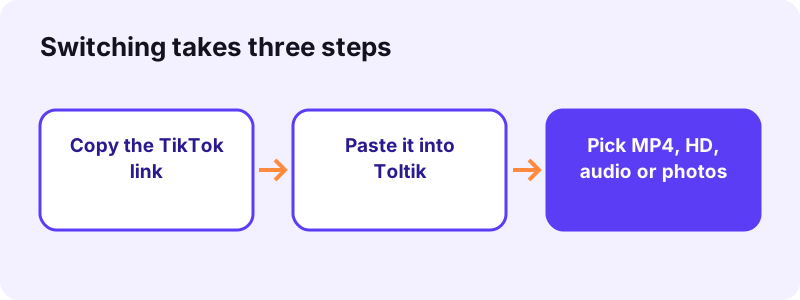
- Copy the TikTok link. In the TikTok app or on tiktok.com, open the public post, tap Share and then Copy link.
- Paste it into Toltik. Open toltik.com, paste the link into the box (or tap Paste) and tap Download.
- Pick the file and save it. Choose the MP4 without watermark, the HD MP4 when there is one, the audio or the photos. Your browser saves the file to its Downloads folder.
Why people look for a SnapTik alternative
Toltik is independent and is not affiliated with SnapTik, SSSTik or TikTok. Product names belong to their owners.
SnapTik is one of the best-known names for saving TikTok videos. That is exactly why so many people search for a SnapTik alternative: when a tool you use every day lets you down once, you want a second option ready.
- A link fails. The page spins, shows an error or returns a file that will not play.
- Ads get in the way. A new tab opens, or you are not sure which button is the real download.
- Too many look-alikes. You are not sure which site with a similar name you actually landed on.
- You want something else. Just the sound, each photo of a slideshow, or a public story.
- You want a backup. Any web tool can have a bad day, so a second one saves time.
Several sites use similar names
On 13 October 2026 we checked a handful of web addresses that use the SnapTik name with different domain endings. At least five of them loaded a page titled as a SnapTik TikTok downloader. We cannot tell from the outside who runs which one, so we do not name or link any of them.
Similar names are not proof of bad intent. Still, it is worth knowing the general risk. Wikipedia describes how look-alike addresses, known as typosquatting, can be used:
“Once on the typosquatter's site, the user may be tricked into thinking that they are actually on the real site through the use of copied or similar content.”
Ads and new tabs
Free tools have to pay for servers somehow, and ads are a normal way to do it. SnapTik's own homepage says the service is free and shows some ads to support it. Whether that bothers you is a personal choice. If it does, a SnapTik alternative with a quieter page may simply suit you better.
- Use the address you typed or bookmarked, not one from a pop-up.
- Keep your browser's pop-up blocker on.
- Never install an app a download page pushes on you.
What to check in any TikTok downloader
Before you settle on any SnapTik alternative, including ours, run it through the same short checklist. A good tool passes every point without asking you for anything personal.
| Check | Good sign | Warning sign |
|---|---|---|
| Account | No sign-up, no login | Asks for your TikTok password |
| Pop-ups | One page, clear buttons | New tabs or fake close buttons |
| Installs | Works in the browser | Pushes an APK or extension first |
| Quality | HD when TikTok stores it | Promises 4K on every video |
| Audio | Separate audio button | Audio only after a survey |
| Private posts | Says plainly it cannot open them | Claims to unlock private videos |
No sign-up and no login
Saving a public video never needs your TikTok account. A page that asks you to sign in with your TikTok password on its own form is collecting credentials, so close it.
No pop-ups and no fake buttons
Apple's support page on pop-ups describes a trick worth remembering whenever you use a free site:
“Some pop-ups and ads have fake buttons that resemble a close button, so use caution if you try to close a pop-up or ad.”
HD when it exists, not fake HD
A downloader can only hand you the copies TikTok stores. If a post was uploaded in low quality, no tool can turn it into true HD. Be wary of anything that promises the same high resolution for every clip.
Audio, photos and stories
- The sound as its own file, not only inside the video.
- Every photo of a slideshow, not just the first one.
- Public stories while they are still live.
Privacy you can read
Look for a privacy page that says what happens to the link you paste. Ours is short: we keep no history of links and store no videos. Read it on the privacy page.
Toltik vs SnapTik: a neutral feature table
Here is how Toltik compares with SnapTik on the points that matter most. The SnapTik column only repeats what SnapTik states on its own homepage, which we read on 13 October 2026. We did not test or rate it, and its features may change.
| Feature | Toltik | SnapTik (per its homepage, checked 2026-10-13) |
|---|---|---|
| Price | Free | Free; says it shows some ads to support the service |
| Ads on the page | None at the time of writing | Yes, as stated above |
| Install needed | No, works in the browser | No for the website; also offers an app for Android and iOS |
| Video without watermark | Yes, MP4 | Yes, MP4 |
| HD | When TikTok stores an HD copy (often 1080p, H.265) | Says it offers the highest resolution available, up to Full HD or higher |
| Audio | MP3 or M4A, as TikTok stores it | Download Audio button; says it does not offer a separate MP3 solution |
| Photo slideshows | Each picture as a JPG | Merges the images and music into an MP4 video |
| Stories | Public stories | Lists a story downloader tool |
| Several videos at once | No, one link at a time | No, says videos are downloaded one by one |
| Download history | None kept; download links expire after one hour | Says it keeps no download history and no copies of videos |
Where the two are alike
- Both are free web tools that start from a copied TikTok link.
- Both save the video as an MP4 without the watermark.
- Both say they do not store your videos.
Where they differ
- Slideshows: Toltik gives you each original photo; SnapTik says it builds a video from them.
- Audio: Toltik names the file for what it is, MP3 or M4A.
- Ads: Toltik shows none at the time of writing.
Neither approach is wrong. If you want a slideshow as a video, a merged MP4 is handy. If you want the original pictures, separate JPGs are better. Pick the SnapTik alternative that matches the job.
How to switch to this SnapTik alternative in 3 steps
Switching takes no setup at all. The tool is at the top of this page, so you can test it right now with a link you already have. If you used SnapTik before, the routine will feel the same.
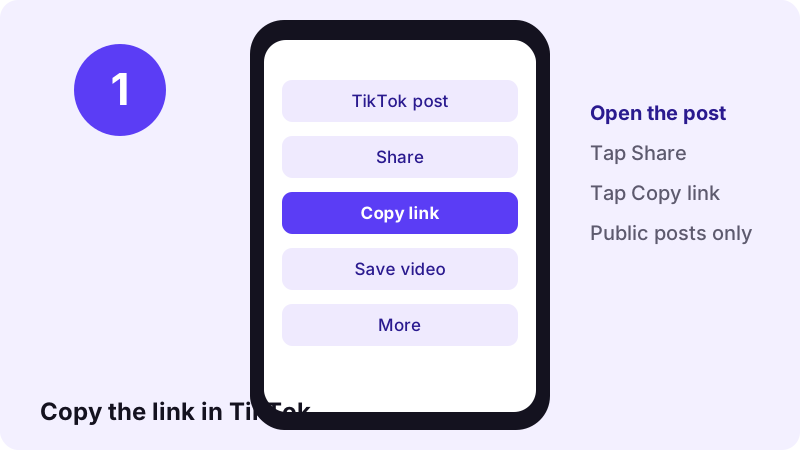
Step 1: copy the link of a public post
- Open the post in the TikTok app or on tiktok.com.
- Tap Share on the side of the video.
- Tap Copy link.
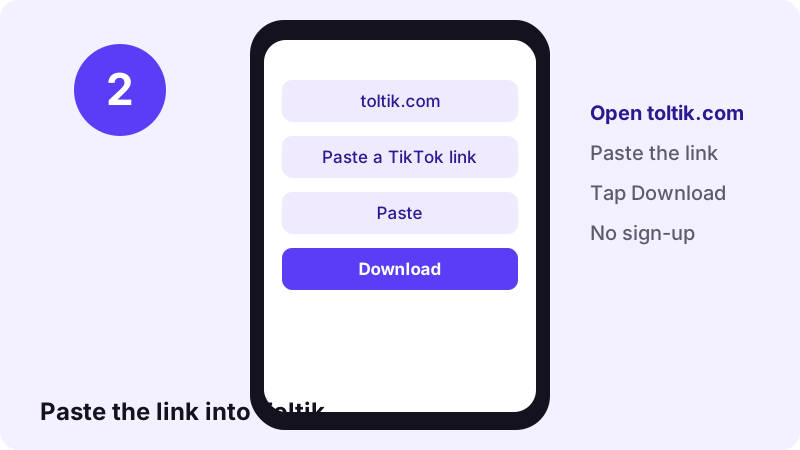
Step 2: paste it into Toltik
Open the Toltik TikTok downloader, or use the box above. Paste the link, or tap Paste, then tap Download. Both the long tiktok.com link and the short shared link work.
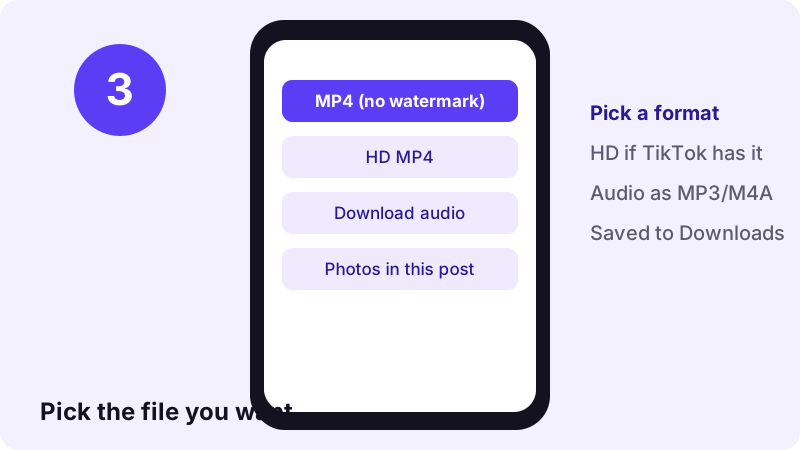
Step 3: pick the file and save it
- MP4 without watermark: plays almost everywhere.
- HD MP4: shown only when TikTok stores an HD copy.
- Audio: the sound of the post.
- Photos: every picture of a slideshow.
Need device-specific help? See our guides for iPhone and PC and Mac.
Save just the sound: MP3 and M4A
Many people looking for a SnapTik alternative really want the audio: a song for a ringtone, a voice-over for an edit, or a sound to listen to offline. Toltik has a dedicated TikTok MP3 downloader for that.
Why the file is sometimes M4A
TikTok stores sounds as MP3 or as M4A (AAC). Toltik gives you the file as TikTok stores it and names it honestly, instead of converting it and losing quality. Both formats play on phones and computers.
How big is a TikTok sound?
Small. In our test, a 15-second sound came back as a 0.25 MB M4A file. That is light enough to keep dozens of sounds on any phone.
- Paste the link of the video, not of the sound page.
- Tap Download audio.
- Rename the file if you plan to keep many sounds.
Photo slideshows and public stories
A good SnapTik alternative should handle more than plain videos. TikTok photo posts and stories work differently, so Toltik treats them separately.
Photo slideshows: every picture as a JPG
Paste the link of a photo post into the TikTok photo downloader. You get every image in the slideshow as its own file, plus the sound, rather than one merged video.
- Good for recipes, outfit grids and step-by-step posts.
- Each picture keeps the size TikTok stores.
- The sound comes as a separate file.
Public stories: before they expire
Stories disappear after a while, so save them while they are live. The TikTok story downloader reads public stories only. A story shared with friends or followers is not public, and Toltik cannot open it.
TikTok lets creators pick who can see each post or story. Its Help Center lists Everyone, Friends (followers you follow back) or Only you on a public account.
HD quality and the H.265 file
Toltik does not upscale or re-encode anything. You get the files TikTok stores for the post. When TikTok keeps an HD copy, often 1080p, an HD MP4 button appears. When it does not, the standard MP4 is the best version that exists.
- HD MP4: often 1080p, encoded in H.265.
- Standard MP4: usually 576p to 720p, in H.264.
- No HD copy stored: no HD button appears.
Why the HD file uses H.265
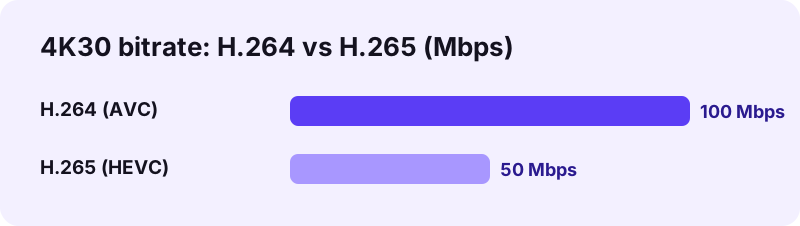
The HD file Toltik returns uses H.265, also called HEVC. It is a newer video codec that keeps the same quality in a smaller file than the older H.264 format.
If the HD file will not play
- Recent iPhones, most Android phones and modern computers play H.265.
- Some older PCs or video editors may not open it.
- In that case, use the standard MP4, which is H.264 and plays almost everywhere.
Speed: what we measured
We do not publish made-up speed claims. Instead, here is what we measured ourselves: on 4 real TikTok posts, all 9 of 9 requests worked, and the Toltik video downloader returned the download links in 0.6 to 1.8 seconds.

- That time covers reading the post and listing the files.
- The download itself depends on your connection and the file size.
- An HD video is bigger than a sound, so it takes longer to save.
We did not time SnapTik or any other tool, so we make no speed comparison. Test any SnapTik alternative with your own links and judge for yourself.
Stop pop-ups in any browser
Whatever downloader you use, your browser's pop-up blocker is the best protection against surprise tabs. Here is how to check it is on.
Chrome on a computer
“By default, Google Chrome blocks pop-ups from automatically showing up on your screen.”
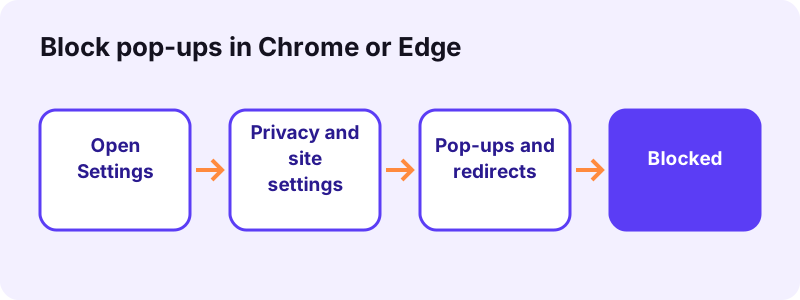
- Open Chrome, select More, then Settings.
- Go to Privacy and security, then Site settings.
- Open Pop-ups and redirects and choose the default you want.
Microsoft Edge
Microsoft says Edge's pop-up blocker is turned on by default. To check it, follow the steps in Microsoft's guide:
- Open Settings and more, then Settings.
- Select Privacy, search, and services, then Site permissions and All permissions.
- Select Pop-ups and redirects and turn on Blocked (recommended).
Safari on iPhone and iPad
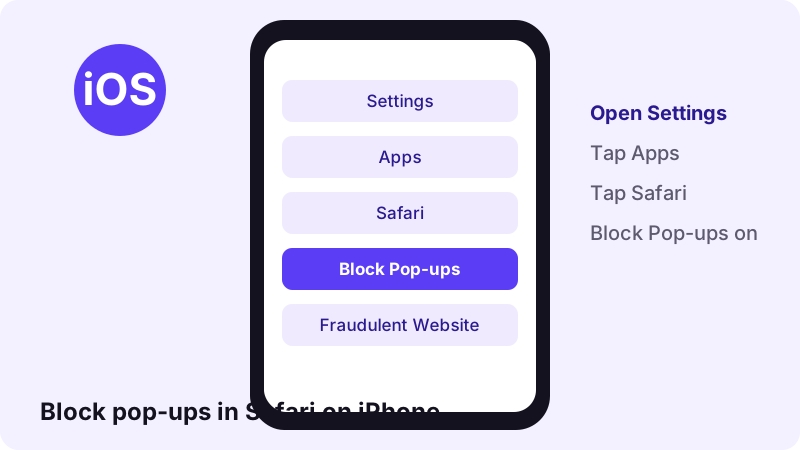
- Open Settings, tap Apps, then Safari.
- Turn Block Pop-ups on.
- Turn Fraudulent Website Warning on as well.
If a page seems to take over your screen, do not tap anything on it. Close the tab and type the address you want instead.
Troubleshooting: when a link will not download
Most failed downloads have a simple cause. Work through these checks before you try yet another SnapTik alternative, because the same limits apply to every honest tool.
The post is private, Friends-only or deleted
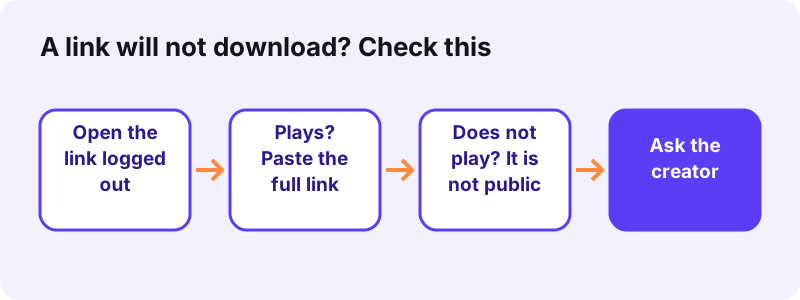
Toltik reads only posts that TikTok shows to anyone, without a login. Open the link in a private browser window. If it does not play there, no web tool can save it. Our guide on private TikTok videos explains the options.
The creator turned off downloads
Inside the app, TikTok only shows its Save video button when the creator allows it:
“If you don't have the option to save a video, this means the creator doesn't allow it.”
Respect that choice: save other people's videos only for personal viewing, or when you have their permission.
The link is incomplete
- Copy the link again with Share → Copy link.
- Paste the whole link, not only the part after the username.
- Remove any text that was copied along with it.
There is no HD button
TikTok does not keep an HD copy of every post. If the button is missing, the standard MP4 is the best file that exists.
The file saved, but you cannot find it
- iPhone: open the Files app and look in the Downloads folder.
- Android: open Files or My Files, then Downloads.
- Windows and Mac: check the Downloads folder.
Apple's iPhone guide confirms that files downloaded from the internet land in the Downloads folder in the Files app.
The post is not available in your region
Some posts are blocked in some countries. If TikTok will not show it to you, Toltik will usually show an error too. Try again later or ask the creator.
Privacy: what happens to the link you paste
Privacy is often the real reason people want a SnapTik alternative. Here is exactly what Toltik does with your request, in plain words.
- Our server reads the public post and returns download links.
- The link you paste is used only to answer that request.
- We keep no history of links and store no videos, sounds or photos.
- Download links are signed and stop working after one hour.
- No advertising cookies and no third-party trackers.
Toltik runs on Cloudflare, which, like any web host, processes technical data such as IP addresses to deliver the site. The full details are on our privacy page.
- Paste a public link.
- Download the file within the hour.
- Close the tab: nothing about your request is kept as a history.
Copyright: save fairly, whichever tool you use
Switching to a SnapTik alternative does not change the rules. The video still belongs to the person who made it. Saving a clip for yourself is one thing; reposting it as your own is another.
“Fair use is a legal doctrine that promotes freedom of expression by permitting the unlicensed use of copyright-protected works in certain circumstances.”
- Save your own videos freely, for backups or edits.
- Save other people's posts for personal viewing.
- Ask the creator before you reuse their video.
- Credit the creator whenever you share their work.
- Never remove the watermark to pass a clip off as yours.
Rules vary by country and this is not legal advice. If you own a video and someone misused it, see our DMCA page.
Is Toltik the right SnapTik alternative for you?
Toltik is a good SnapTik alternative if you want a quiet page and the original files, and you only need public posts.
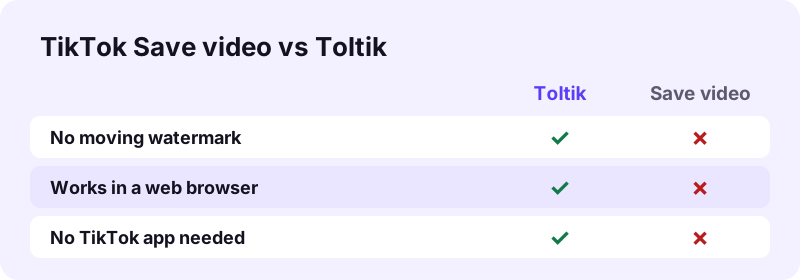
Choose Toltik if you want
- No account, no app and no sign-up.
- The MP4 without the watermark, and HD when TikTok has it.
- The sound as MP3 or M4A, and each slideshow photo as a JPG.
- Public stories, saved before they expire.
Look elsewhere if you need
- Private, Friends-only or deleted posts: no honest tool can open them.
- Many videos at once: Toltik works one link at a time.
- A slideshow merged into a single video.
Ready to try it? Scroll back to the box at the top, or open the free TikTok video downloader on our home page. These tools all work the same way:
Frequently asked questions
What is a good SnapTik alternative?
Look for a free web tool with no sign-up, no pop-ups, HD when TikTok stores it, and separate audio and photo downloads. Toltik does all of that for public TikTok posts, and you can use the TikTok downloader without an account.
Is Toltik part of SnapTik?
No. Toltik is independent and is not affiliated with SnapTik, SSSTik or TikTok. Product names belong to their owners.
Why does SnapTik sometimes not work for a link?
We cannot speak for another service. With any downloader, the most common causes are a private or deleted post, an incomplete link or a post blocked in your region. Check that the link plays while you are logged out.
Is Toltik free?
Yes. Toltik is free, needs no sign-up and shows no ads at the time of writing.
Does Toltik remove the TikTok watermark?
Toltik gives you the MP4 that TikTok serves without the moving watermark, plus an HD copy when TikTok has one.
Can I download TikTok audio as MP3?
Yes. Use the TikTok MP3 page. The sound comes as MP3 or M4A, depending on how TikTok stores it.
Can Toltik save TikTok photo slideshows?
Yes. The photo downloader gives you every picture of a public slideshow as a separate file.
Can I download private TikTok videos with a SnapTik alternative?
No. Toltik, like any honest tool, reads public posts only. Private, Friends-only, Only you and deleted posts cannot be downloaded.
Does Toltik keep the videos I download?
No. We keep no history of the links you paste and store no files. Download links expire after one hour.
Do I need an app to use Toltik on iPhone?
No. Toltik works in Safari. Downloaded files go to the Downloads folder in the Files app.
Guides
Video — Save TikTok videos as MP4 without watermark, in HD.
- SSSTik.io Alternatives: A Free Way to Save TikToks
- Does TikTok notify when you save a video?
- How to Save a TikTok Draft Without Posting It
- How to Download TikTok Videos on iPhone
- TikTok Video Not Downloading? How to Fix It
- How to Download TikTok Videos on PC and Mac
- How to Download Private TikTok Videos (What Really Works)
Sources
- Download content — TikTok Help Center — TikTok
- Post privacy settings — TikTok Help Center — TikTok
- Block pop-up ads and windows in Safari — Apple Support
- Find your downloaded files on iPhone — Apple Support
- Block or allow pop-ups in Chrome — Google
- Block pop-ups in Microsoft Edge — Microsoft Support
- U.S. Copyright Office Fair Use Index — U.S. Copyright Office
- Typosquatting — Wikipedia
- Pop-up ad — Wikipedia
- High Efficiency Video Coding — Wikipedia