How to fix a TikTok video that is not downloading
- Look for Save video in TikTok. Open the post, tap Share and look for Save video. If it is missing, the creator does not allow downloads.
- Check the post is public. Open the link in a browser while logged out. If you cannot watch it there, no web downloader can fetch it either.
- Copy a fresh link. Tap Share, then Copy link. Do not copy a profile, hashtag or search page.
- Paste it and download. Paste the link into Toltik and tap Download. Download links expire after 1 hour, so paste again if an old one fails.
- Find the file. Open your browser's downloads list. On iPhone, Safari saves to the Downloads folder in the Files app.
- Play the right version. If the HD file will not play, use the standard MP4. The HD copy is often H.265 (HEVC), which some older players cannot decode.
Why is my TikTok video not downloading?
Short answer: either TikTok will not let you save that post, or the tool you are using cannot read the link you gave it. Those are two separate problems, so the first job is to find out which one you have.
Toltik is independent and is not affiliated with SnapTik, SSSTik or TikTok. Product names belong to their owners.
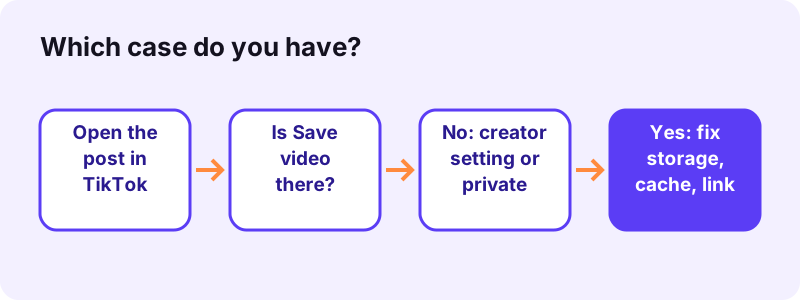
Case A is TikTok's own Save video button. It may be missing, or it may be there and fail. That depends on the creator's settings, the account type and your phone.
Case B is a web downloader such as Toltik, the free TikTok downloader. Here the usual causes are a wrong link, a private or deleted post, or a browser that blocks the file.
30-second checks before anything else
- Open the post in TikTok. Is the Save video button in the Share menu?
- Open the same link in a browser while logged out. Can you watch it?
- Is your phone close to full? A download needs free space.
- Are you on a weak signal? Switch between Wi-Fi and mobile data.
- Did you copy the link of the video, not of a profile or a hashtag?
If you answered no to the first check, jump to Case A below. If you can watch the post logged out but your downloader still fails, jump to Case B.
Quick diagnosis: symptom, cause and fix
Find the line that matches what you see. Each cause has its own section further down with the full steps.
| What you see | Likely cause | Fix |
|---|---|---|
| No Save video in the Share menu | The creator turned off video downloads | Respect it: ask the creator, or keep a link instead |
| No Save video, and the account is locked | Private account (downloads are always off) | Nothing to do on your side |
| Save video starts, then stops | Phone storage full or weak connection | Free up space, switch networks, try again |
| TikTok app freezes on saving | Old app version or a heavy cache | Update TikTok, restart, clear the cache |
| Web tool: “We could not read that post” | Post is private, deleted or region-blocked | Check it logged out; only public posts work |
| Web tool: nothing happens after Download | Pop-up or download blocked by the browser | Allow the blocked link from the address bar |
| Old download link gives an error | Download links expire after 1 hour | Paste the TikTok link again |
| File saved but not in Photos (iPhone) | Safari saves to Files, not Photos | Files, Downloads, then Share, Save Video |
| File plays sound only or a black screen | HD file uses H.265 (HEVC) | Use the standard MP4 or add an HEVC decoder |
Two rows cannot be fixed by anyone but the creator: a private account and a creator who turned downloads off. Everything else is on your device, your link or your browser.
- Creator side: private account, downloads switched off, creator under 16.
- Your side: storage, cache, connection, app version.
- Link side: wrong link, expired download link.
- Browser side: pop-up blocker, extension, download folder.
Case A: TikTok's Save video button is missing
This is the most common reason for a TikTok video not downloading inside the app. TikTok's help centre is direct about it.
“If you don't have the option to save a video, this means the creator doesn't allow it.”
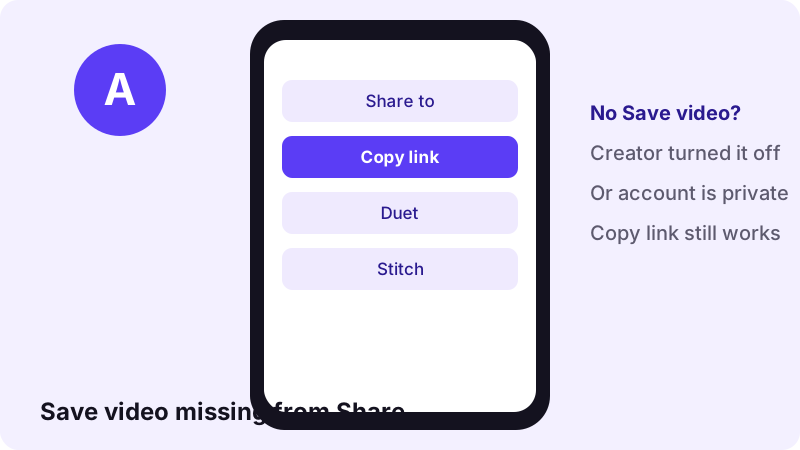
The creator turned off video downloads
Every creator has a Video downloads switch. In the TikTok app they open Profile, the Menu, Settings and privacy, Privacy, then Downloads. When it is off, nobody else gets the Save video button on their posts.
Per TikTok Help, turning it off applies to posts already published and to future ones. Copies people saved while it was on stay on their devices.
The account is private
A private TikTok account blocks downloads of its posts. TikTok says people won't be able to Duet, Stitch or download the videos of a private account.
The creator is under 16
“If your account is private or if you're under the age of 16, your video downloads setting is turned off by default and you can't turn it on.”
What you can still do
- Tap Copy link and keep the link. TikTok notes that people can still share content through a link.
- Add the post to your Favorites so you can find it again in the app.
- Message the creator and ask for the file. Many say yes when asked politely.
- If the video is your own, change your own Downloads setting, or save it from your profile.
Case A: Save video is there but the download fails
If the button is in the Share menu but the save stops, freezes or never shows up in your gallery, the post is fine. The problem is your phone, the app or the connection.
Your phone is out of storage
A video needs free space to land. On iPhone, open Settings, tap General, then tap iPhone Storage to see what is using space, as Apple explains.
“If your device shows a “Storage Almost Full” alert, check the storage recommendations or remove some content, such as videos and apps.”
On Android, the Android Help Center suggests deleting downloaded files you do not need and clearing app caches.
The TikTok cache is too heavy
“If internet connectivity isn't a problem, or if TikTok is taking up too much storage on your device, try clearing your app cache. This removes temporary files that may be causing issues.”
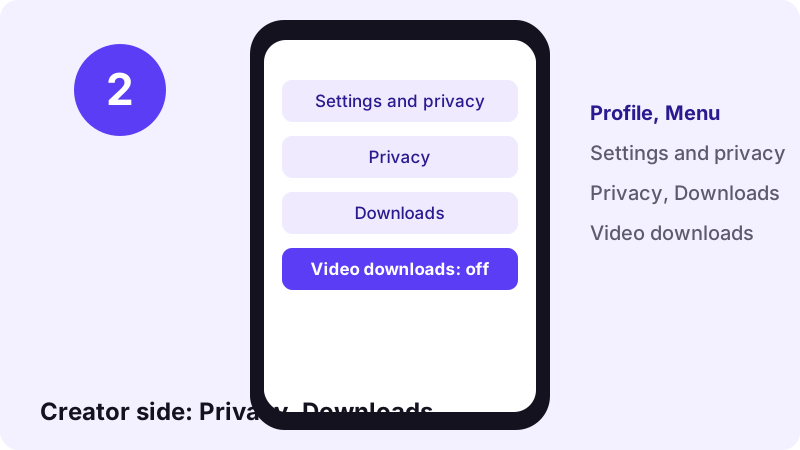
- In the TikTok app, tap Profile at the bottom.
- Tap the Menu button at the top, then Settings and privacy.
- Tap Free up space. You may need to scroll down.
- Tap Clear next to Cache, then Clear again to confirm.
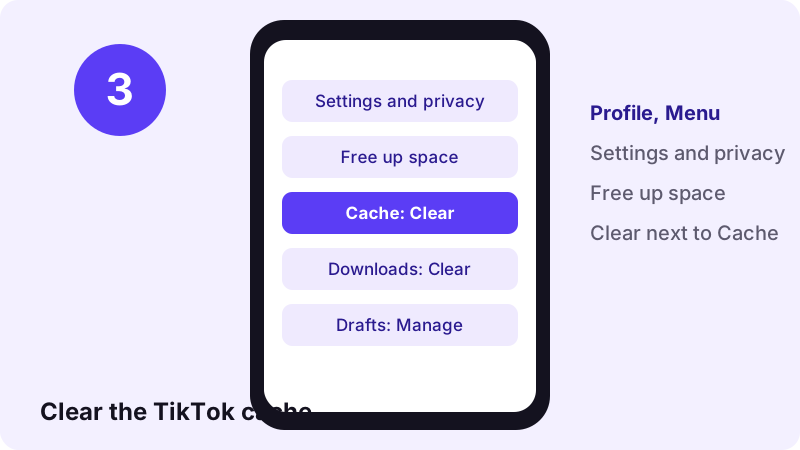
Be careful on that screen. The same page has a Clear button for Downloads and a Manage button for Drafts. Only the Cache button is needed here.
The connection drops mid-save
- TikTok's troubleshooting page says weak data or Wi-Fi signals can affect the app.
- It suggests switching between Wi-Fi and mobile data to test the connection.
- Try the save again on the other network.
The app or the phone needs a restart or an update
- Close TikTok fully and open it again.
- Restart the phone. TikTok lists this as the first step.
- Update TikTok from the App Store or Google Play.
- Update the phone's operating system if an update is waiting.
Region, age and feature limits
Some posts are not available in every country, and some features roll out to a few people first. Both can look like a TikTok video not downloading, when the real issue is that the post or the button is not offered to you.
A post you cannot watch
- If a video will not play where you are, it will not save either.
- That limit sits on TikTok's side.
- Neither a phone setting nor a web tool can change it.
Features still being tested
TikTok says it regularly tests features with a limited number of users, so some new features or changes may not be available to you yet. If a friend sees an option you do not, this may be why.
- Update the app first: an older version may lack the option.
- Compare on a second device signed in to the same account.
- If nothing changes, report it in the app (see the last section).
Case B: a web downloader is not working
A web downloader reads the public page of a post and hands you the file. It never logs in as you, so it sees exactly what a logged-out visitor sees. That one fact explains most failures.
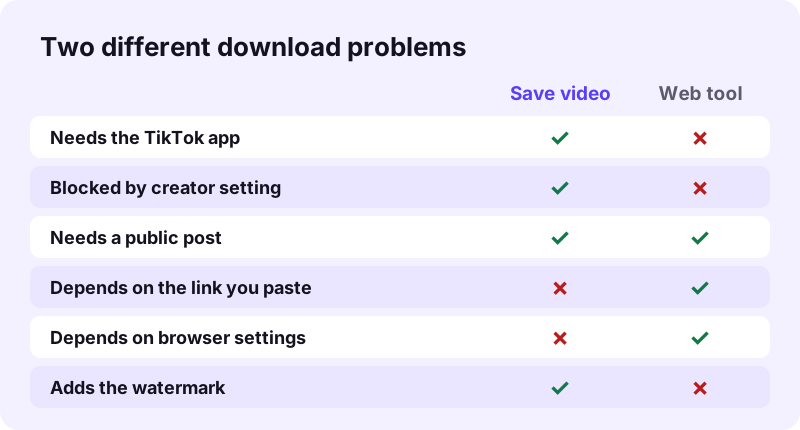
When a web tool says it cannot download a TikTok, the cause is usually one of these:
- The text you pasted is not a link to one post.
- The post is private, deleted or blocked in your region.
- The browser blocked the new tab or the file.
- An old download link expired.
- The file saved fine, but somewhere you did not expect.
- The site itself is down or overloaded for a while.
- Check the link first.
- Then check the post is public.
- Then the browser and the download folder.
Copy the right TikTok link
A web downloader needs the address of one post. Copying from the wrong place is the quickest way to end up with a TikTok video not downloading.
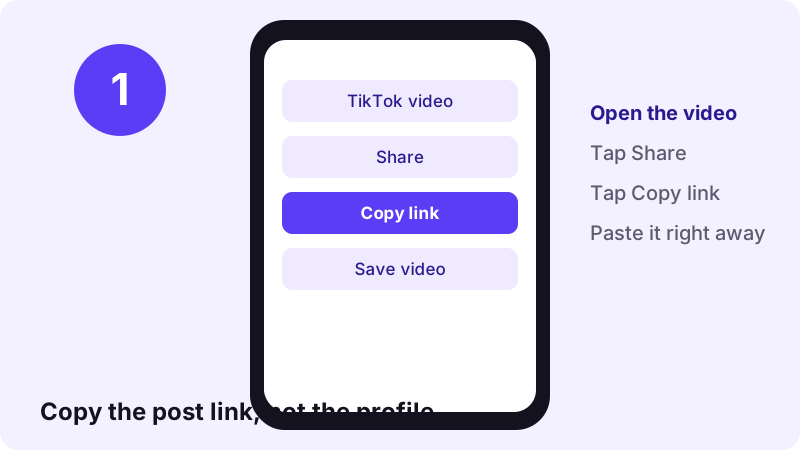
Use Share, then Copy link
- Open the video itself in TikTok, full screen.
- Tap the Share arrow on the right.
- Tap Copy link.
- Paste it straight away, before you copy anything else.
Short links are fine
Links like vm.tiktok.com/… or vt.tiktok.com/… work on Toltik. If one fails, open it in your browser, let the full TikTok page load, then copy the long address from the address bar.
Links that never work
- A profile link (
tiktok.com/@namewith nothing after it). - A hashtag, search or sound page.
- A link with extra words pasted around it from a message.
- Half a link cut off by a chat app.
Need the sound only? Paste the same post link into the TikTok MP3 downloader. For a photo slideshow, use the TikTok photo downloader.
Private, deleted or region-blocked posts
Toltik only works with public posts. If a post is private, deleted or not shown in a region, you will see “We could not read that post”. No web tool can fix that from the outside.
Test the link while logged out
- Open a private or incognito window in your browser.
- Paste the TikTok link and open it.
- If the video plays, it is public: the problem is elsewhere.
- If it asks you to log in or says it is unavailable, it is not public.
The post was deleted or set to private
- Creators can delete a post or switch its audience at any time.
- A link that worked yesterday can fail today.
- If the post is gone from TikTok, there is no file left to download.
For more on this, see our honest guide to private TikTok videos.
When the browser blocks the download
Sometimes the link is fine and the post is public, yet nothing appears after you tap Download. The browser is often the one saying no.
A pop-up blocker stopped the file
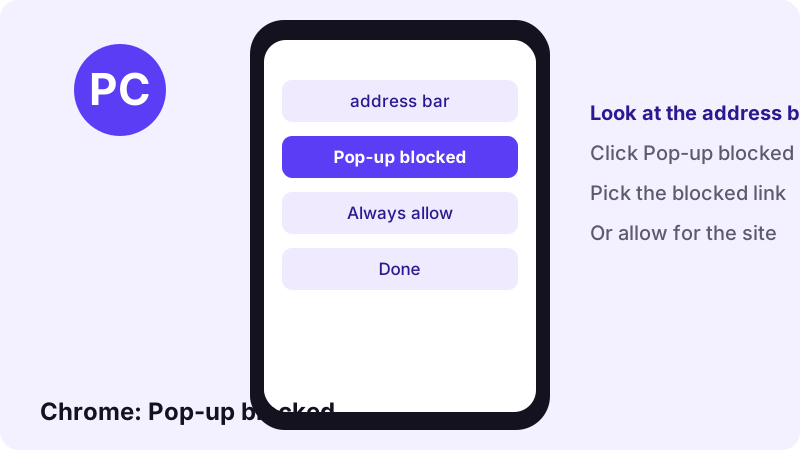
“By default, Google Chrome blocks pop-ups from automatically showing up on your screen.”
- Look for Pop-up blocked in the address bar.
- Click it, then click the link you want to open.
- To stop it happening again, choose to always allow pop-ups and redirects from that site.
The download went to an unexpected folder
Every browser saves to a download folder you can check in its settings. In Microsoft Edge, open Settings and more, Settings, then Downloads to see the folder under Location, as Microsoft explains.
The download link expired
Toltik's download links expire after 1 hour. If you left the tab open and come back later, paste the TikTok link again to get a fresh one.
An extension is in the way
- Try the same link in a private window, where most extensions are off.
- If it works there, turn your ad or script blocker off for the site.
- Or simply try a second browser.
TikTok video not downloading on iPhone
On iPhone, the file often did download. It just went to the Files app, not to Photos, so it looks like the TikTok video is not downloading when it is.
Where Safari puts the MP4
Go to Settings, tap Apps, tap Safari, then tap Downloads. Apple lists three choices: iCloud Drive, On My iPhone, or Other, a folder you pick.
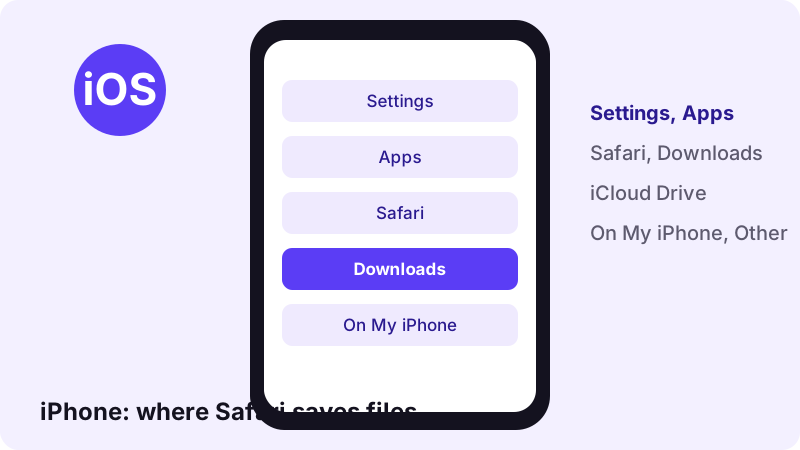
- Open the Files app and tap Browse.
- Open Downloads. Not there? Tap iCloud Drive first.
- Tap the MP4, tap Share, then Save Video to copy it to Photos.
iCloud Drive is full
- Go to Settings, tap Apps, then Safari.
- Tap Downloads and pick On My iPhone.
- Paste the TikTok link again and download.
Our step-by-step guide on how to download TikTok videos on iPhone shows every tap with pictures.
TikTok video not downloading on Android or a computer
On Android, Chrome saves to the Downloads folder by default. If the save fails in the TikTok app, the storage and cache steps above apply.
Android: clear the cache of the app that fails
“Clear cache: Deletes temporary data. Some apps may be slow the next time you open them.”
Avoid Clear storage unless you know what you are doing: Android Help says it permanently deletes all app data.
Windows, Mac and Linux
- Copy the address from the browser bar while the video is open.
- Paste it into Toltik and click Download.
- Open the browser's downloads list to find the MP4.
- If the HD file will not play on Windows, read the next section.
The full desktop walkthrough is in our guide on how to download TikTok videos on PC.
The file downloaded but will not play
- A black screen with sound.
- Sound with no picture.
- A codec or format error.
- None of these mean the download failed: the player cannot decode the HD file.
Toltik's HD MP4 often uses H.265, also called HEVC. The standard MP4 uses H.264, which plays almost anywhere.
“HEIF and HEVC offer better compression than JPEG and H.264, so they use less storage space on your devices and iCloud Photos, while preserving the same visual quality.”
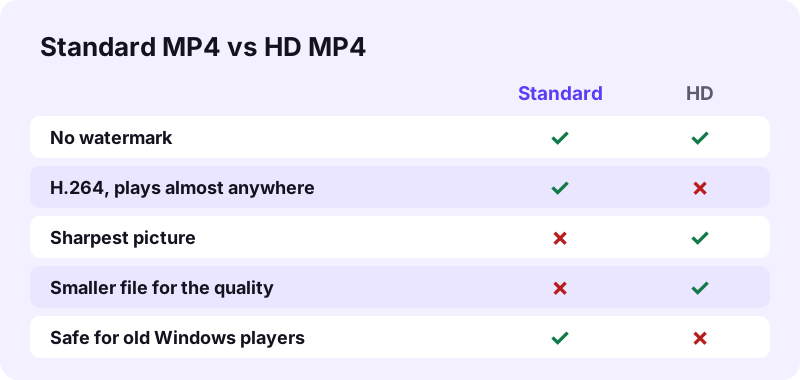
| File | Codec | If it will not play |
|---|---|---|
| Standard MP4 | H.264 | Try another player; this file is the most compatible |
| HD MP4 | Often H.265 (HEVC) | Use the standard MP4, or add an HEVC decoder on Windows |
| Sound (M4A) | Audio only | Open it in a music player, not a video player |
Want the audio only? A 15-second sound is about 0.25 MB as M4A on the TikTok MP3 page.
SnapTik or SSSTik not working?
People often search for these two names when a download fails. Toltik is independent and is not affiliated with SnapTik, SSSTik or TikTok. Product names belong to their owners.
- We cannot see inside any other site, so we do not guess why one is down on a given day.
- Every web downloader faces the same limits: public posts only, a valid post link, a browser that allows the file.
- So the same checks apply to all of them.
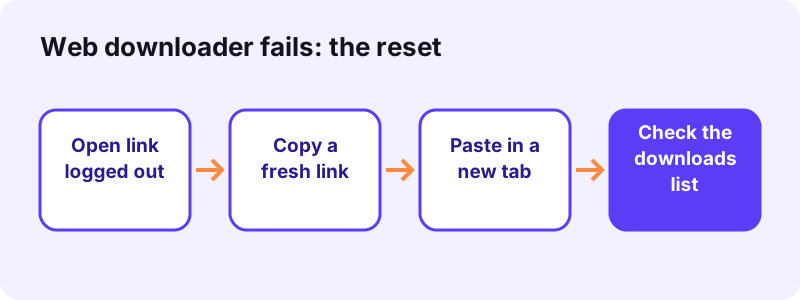
SnapTik not working
- Check that the post plays while logged out.
- Copy a fresh link with Share, then Copy link.
- Paste it in a new tab with extensions off.
- Look in your browser's downloads list before trying again.
If you want another option, read our page on an alternative to SnapTik.
SSSTik not working
The same four checks apply. If they all pass and it still fails, try a different tool for that link. Our page on an alternative to SSSTik compares the options neutrally.
When any site seems down
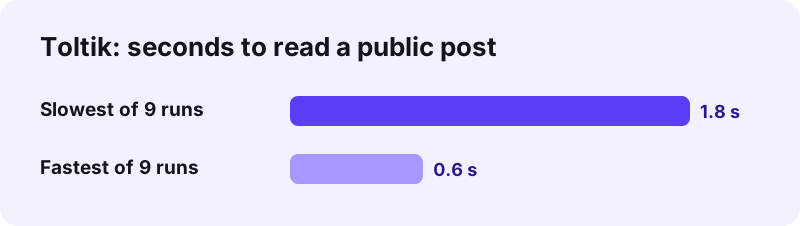
Try the same public link in Toltik. In our test on four real posts, it read each link in 0.6 to 1.8 seconds, and 9 of 9 runs worked.
Still not downloading? Last steps and fair use
If you have checked the link, the post, the browser and the storage, two options remain: ask the creator or ask TikTok.
Report a problem to TikTok
TikTok's troubleshooting page describes this route for problems that remain after the basic steps:
- Open a help article in the TikTok app.
- Tap Need more help? at the bottom.
- Follow the steps to submit a ticket.
Respect the creator's choice
Some creators turn off downloads in the app. Respect that choice: save other people's videos only for personal viewing, or when you have their permission.
- Ask before you repost, remix or reuse a clip.
- Credit the creator by name when you share.
- Save your own videos freely.
Ready to try again? Go back to the TikTok downloader at the top of this page and paste a fresh link.
This is not legal advice and rules differ by country. Owners can report misuse on our DMCA page.
Frequently asked questions
Why is my TikTok video not downloading?
Either the creator turned off downloads (or the account is private), so TikTok hides Save video, or your phone, link or browser is the problem: full storage, weak signal, a wrong link or a blocked download.
Why is there no Save video button on a TikTok?
TikTok says that if you don't have the option to save a video, the creator doesn't allow it. Private accounts and creators under 16 always have downloads off.
Can I download a TikTok when the creator turned downloads off?
TikTok's own button will not appear. Respect the creator's choice: keep the link, ask the creator for the file, or save it only for personal viewing.
Why does Save video stop halfway?
Usually low storage or a weak connection. Free up space, switch between Wi-Fi and mobile data, then clear the TikTok cache in Settings and privacy, Free up space.
Which button should I tap on Free up space?
On TikTok's Free up space screen, Cache, Downloads and Drafts are separate items with their own buttons. To fix a failing save, only tap Clear next to Cache.
Why does a downloader say it cannot read the post?
The post is private, deleted or not available in your region, or the link is not a post link. Open it logged out: if you cannot watch it, no web tool can save it.
I downloaded the TikTok on iPhone but it is not in Photos. Why?
Safari saves files in the Files app, in Downloads. Open the MP4, tap Share, then Save Video to copy it to Photos.
Why does the HD TikTok file play sound only?
The HD file often uses H.265 (HEVC). Some older players cannot decode it. Use the standard MP4, which uses H.264.
Is Toltik the same as SnapTik or SSSTik?
Toltik is independent and is not affiliated with SnapTik, SSSTik or TikTok. Product names belong to their owners.
Can Toltik download private TikTok videos?
No. Toltik only works with public posts. Private, deleted and region-blocked videos cannot be downloaded.
Guides
Video — Save TikTok videos as MP4 without watermark, in HD.
- Looking for a SnapTik Alternative? Try Toltik
- SSSTik.io Alternatives: A Free Way to Save TikToks
- Does TikTok notify when you save a video?
- How to Save a TikTok Draft Without Posting It
- How to Download TikTok Videos on iPhone
- How to Download TikTok Videos on PC and Mac
- How to Download Private TikTok Videos (What Really Works)
Sources
- Download content — TikTok Help Center
- Manage video downloads — TikTok Help Center
- Choosing between a private or public account — TikTok Help Center
- Troubleshooting on TikTok — TikTok Help Center
- How to check the storage on your iPhone and iPad — Apple Support
- Customize your Safari settings on iPhone — Apple Support
- Using HEIF or HEVC media on Apple devices — Apple Support
- Free up storage on your Android device — Android Help
- Block or allow pop-ups in Chrome — Google Chrome Help
- Find where your browser is saving downloads — Microsoft Support