How to save a TikTok draft to your camera roll without posting
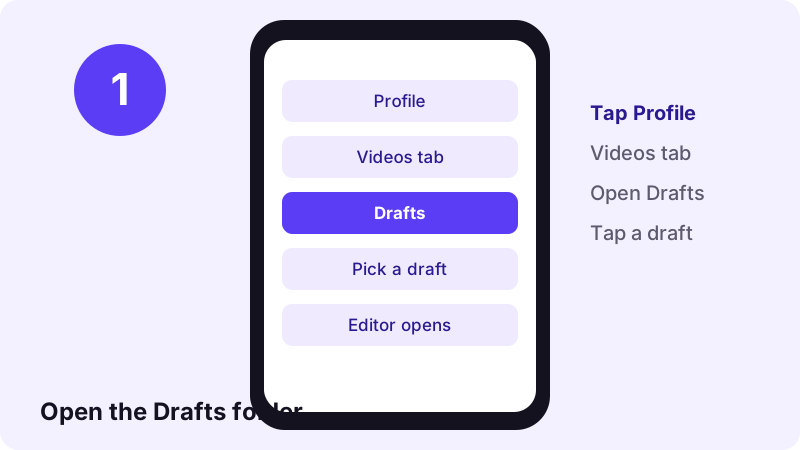
- Open the draft. In the TikTok app, tap Profile, open the Drafts folder in your videos tab and tap the draft you want to keep.
- Go to the editing screen. Let the draft open in the editor. Do not tap Post. You only need the screen with the tools on the side panel.
- Tap Save. Tap Save on the side panel to download that single video or photo post to your phone. TikTok documents this button in its help page on downloading content.
- No Save button? Use Save to device. Tap Next, set who can view the post to Only you, open More options and turn on Save to device. Then post it privately.
- Check your gallery and back it up. Open Photos (iPhone) or your gallery app (Android) and confirm the video is there. Turn on iCloud Photos or Google Photos backup so the copy survives a lost phone.
What is a TikTok draft, and where is it stored?
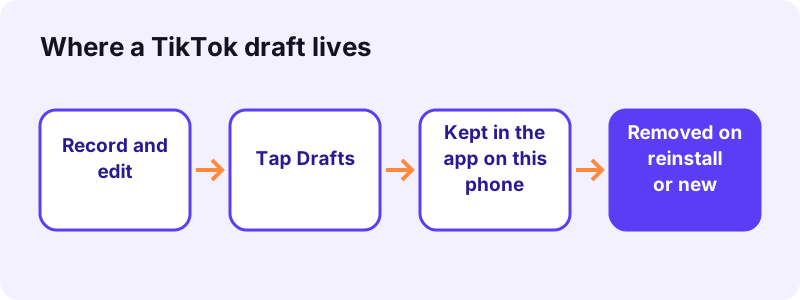
A TikTok draft is a video or photo post you recorded and edited but did not publish. Instead of tapping Post, you tapped Drafts, and TikTok kept the project so you can finish it later.
“Drafts are saved to the videos tab on your profile. Your drafts are only available to others when you post them.”
That privacy is the good news. The bad news is in the same help page: drafts are tied to the app on one device. TikTok says drafts may be removed when the app is uninstalled and reinstalled, or when the account is moved or switched to a different device.
Why people want to save TikTok drafts without posting
- You are about to change phones and do not want to lose months of unposted edits.
- You need to reinstall TikTok to fix a bug, and a reinstall can wipe every unsaved edit.
- You want to share a finished edit privately with a friend or a client, not with your followers.
- You want to post the same video on another platform or keep it as a personal memory.
- Your phone is running out of storage and you want the clips in your gallery or the cloud.
What TikTok's help page says can delete a draft
- TikTok has been uninstalled, then reinstalled on a device.
- The account has been moved or switched to a different device.
The same page adds that drafts cannot be shared or transferred between accounts. So logging in to a second account will not bring a TikTok draft along with you. If a draft matters, export it to your phone's gallery first.
Can a website download your drafts? No, and here is why
Search for a way to download drafts and you will see sites that promise to do it from a link. That cannot work. A TikTok draft has no public link. It has never been published, so there is no web page for any tool to read.
Toltik, our free TikTok downloader, is built for public posts only. You paste the link of a public video and it returns the files TikTok already serves for that post. It cannot see your drafts, your posts set to Only you or anything behind a private account.
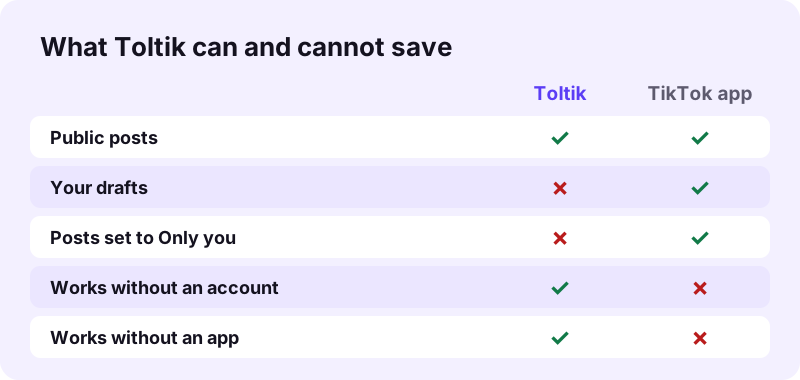
Be careful with any app or site that asks for your TikTok password to "export drafts". Toltik never asks you to log in. Your drafts are only reachable through the TikTok app on your own phone.
So the real methods all happen inside the TikTok app, or with the screen recorder that is already built into iPhone and Android. The next sections walk through them in order, from the cleanest to the roughest.
Method 1: save a TikTok draft with the Save button (no posting)
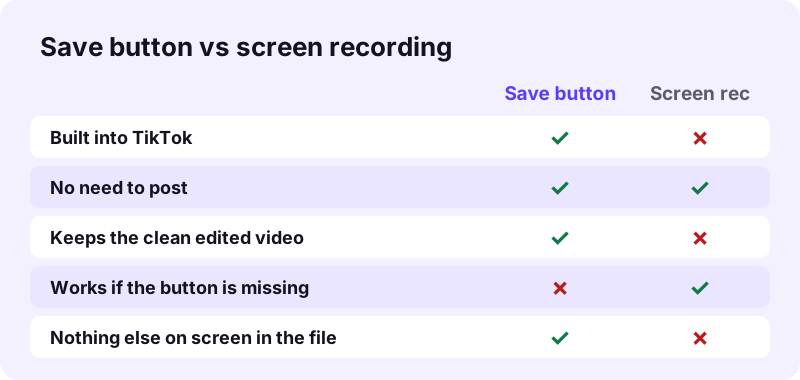
This is the cleanest way to get drafts to camera roll. TikTok's help page on downloading content says you can tap Save on the side panel while editing to download a single photo or video post. You never have to publish anything.
Step by step
- Open TikTok and tap Profile at the bottom.
- In the videos tab, open the Drafts folder.
- Tap the draft you want to keep. It opens in the editor.
- Look at the side panel and tap Save.
- Wait for the save to finish, then leave the editor without posting.
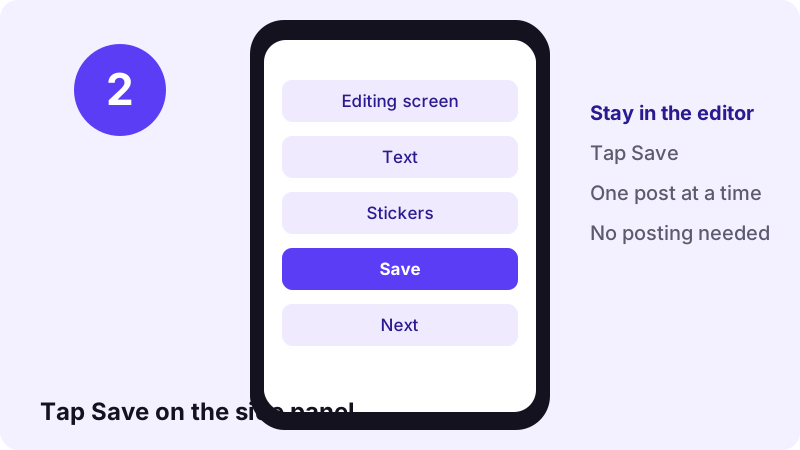
Repeat this for each draft. TikTok's page describes it for a single post at a time, and we did not find an official bulk export for drafts. If you have dozens, start with the ones you cannot recreate.
If you do not see a Save button
- Update TikTok. The help page tells you to run the latest version when posting features misbehave.
- Check both the recording screen and the editing screen, since TikTok's help pages place different tools on each side panel.
- If the button is still missing, use Method 2 below.
Method 2: post as Only you with Save to device turned on
TikTok's own advice is to download your content before you post it. Its help page puts it plainly:
“We recommend downloading your videos or photos before you post so that you have offline copies of your content.”
The tool for that is the Save to device setting on the Post screen. Pair it with the Only you privacy option and the TikTok draft becomes a private post that nobody else can watch, while a copy goes to your phone.
Set the draft to Only you, then save to device
- Open the draft from the Drafts folder on your profile.
- Tap Next to reach the Post screen.
- Open the privacy setting and choose Only you.
- Tap More options and turn the Save to device setting on.
- Tap Post. The post is visible only to you, and you can find it behind the Lock icon on your profile.
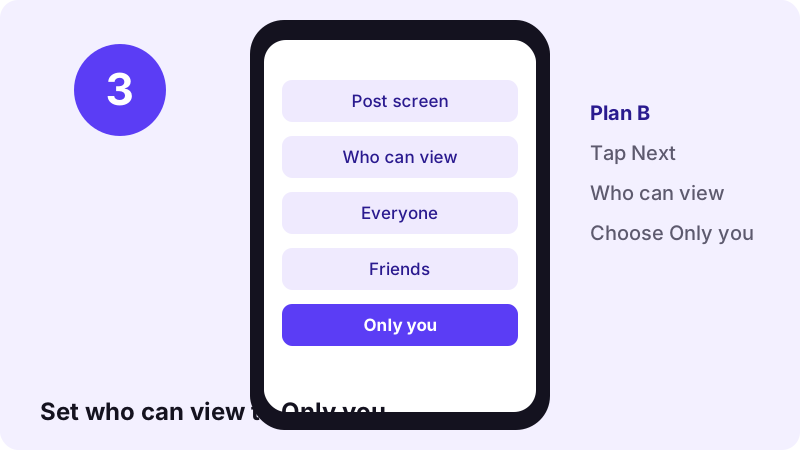
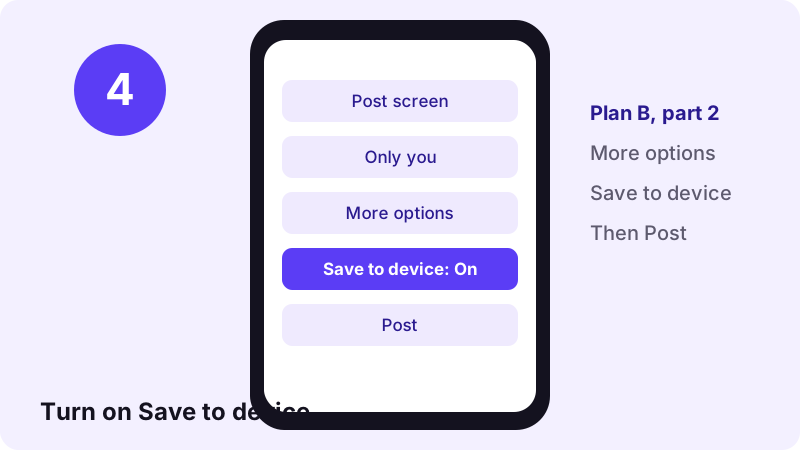
TikTok's post privacy page confirms the options: a public account can pick Everyone, Friends or Only you, and a private account can pick Followers, Friends or Only you. Its help page on making a post says private videos sit behind the Lock icon on your profile.
Two traps to avoid
- Your next post inherits the setting. TikTok says new posts keep the previous post's privacy setting. After a private save, switch back to Everyone before your next real post.
- It is still a post. The view count does not reset if you change privacy later, so decide before you publish.
- Check the file. TikTok does not say exactly when the copy is written, so open your gallery after posting and confirm the video is there.
- Deleting is reversible for 30 days. If you delete the private post, it stays in Recently deleted for up to 30 days before it is gone.
Once the private copy is safe in your gallery, you can keep the Only you post as a second backup or delete it. Later, if you make it public, anyone can save it with the TikTok video downloader like any other public post.
Method 3: screen-record the draft on your camera (last resort)
If neither button works, you can record your screen while the draft plays. Every recent iPhone and Android phone has a recorder built in, so you do not need another app.
On iPhone and iPad
- Open the draft in the editor so it is ready to play.
- Swipe down from the top-right corner to open Control Center.
- Tap the gray Record button and wait for the three-second countdown.
- Exit Control Center, play the draft from start to end.
- Tap the Screen Recording button at the top of the screen, then tap Stop.
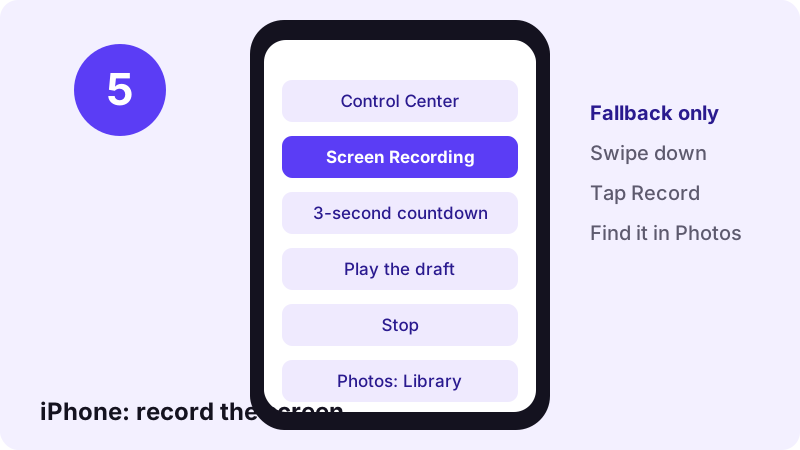
“To find your recording, open the Photos app and select your screen recording in your Library.”
Apple also warns that some apps might not allow you to record audio or video. If your clip comes out silent, see Apple's screen recording guide to record with the microphone setting.
On Android
- Swipe down twice from the top of the screen.
- Tap Screen record. If it is not there, tap Edit and drag it into Quick Settings.
- Choose what to record and whether to capture audio, then tap Start.
- Play the draft, then swipe down and tap the Screen recorder notification to stop.
- Find the file in the Photos app under Collections, On this device, Movies.
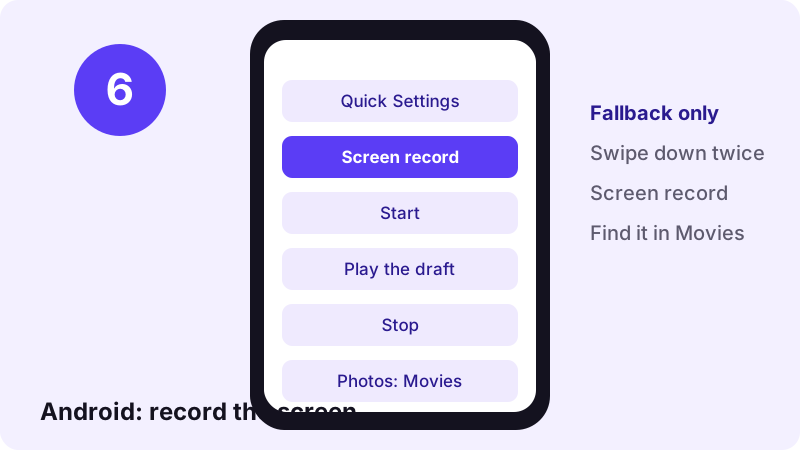
Those steps come from Google's Android help on recording your screen. Menus differ between phone makers, so the tile name can vary slightly on Samsung, Xiaomi or other brands.
The quality trade-off
- A screen recording is a copy of what the screen shows, not the original edit, so the picture can be softer.
- Editor buttons, the status bar and notifications can end up in the frame. Turn on Do Not Disturb first.
- You must crop the start and end, where you tapped Record and Stop.
- Sound depends on the recorder settings, and some apps block audio capture.
What happens to your TikTok drafts when you delete the app or switch phones
This is the question that makes people search for how to save TikTok drafts without posting. The official answer is short: TikTok says drafts may be removed after a reinstall and when the account moves to a different device.
| Situation | What happens to drafts | What to do first |
|---|---|---|
| Log out and back in on the same phone | Not covered by TikTok's help page | Export important drafts anyway |
| Uninstall and reinstall TikTok | Drafts may be removed (official) | Save every draft before you uninstall |
| Move to a new phone | Drafts may be removed (official) | Save drafts to camera roll on the old phone |
| Switch to another TikTok account | Drafts cannot be transferred (official) | Post or save from the original account |
| Phone lost or broken | Drafts stay on that phone | Keep a cloud backup of exported drafts |
TikTok's page does not promise anything for a simple log-out on the same phone, so do not count on it. The safe habit is simple: every TikTok draft you care about should exist as a file in your gallery, not only inside the app.
Checklist before you change phones
- Open the Drafts folder and count your drafts, so you know if anything is missing later.
- Save each draft with Method 1 or Method 2.
- Check that every video plays from your gallery, with sound.
- Let your cloud backup finish on Wi-Fi before you wipe the old phone.
- Only then uninstall TikTok or reset the device.
How to back up drafts once they are in your camera roll
Getting drafts to camera roll is half the job. A gallery on one phone can still be lost. Send the files to the cloud so they follow your account instead of your device.
iPhone: iCloud Photos
Apple says iCloud Photos keeps every photo and video in iCloud so you can reach your library from any device. To turn it on, go to Settings, tap your name, select iCloud, tap Photos and turn on Sync this device.
Android or iPhone: Google Photos backup
Google says Google Photos backup saves photos and videos to your Google Account, private to you unless you share them. It accepts .mp4 and .mov videos up to 10 GB each.
- Name or album your exported drafts, for example an album called "Saved drafts".
- Back up on Wi-Fi to save mobile data.
- Keep a second copy on a computer if the drafts are client work.
- Remember that cloud storage is shared with other services and can fill up.
After you post: saving public TikTok videos
Once a TikTok draft is published as a public post, it has a normal share link, and the rules change. Now any public video can be saved from a link, on any device, without the app.
- Use the Toltik TikTok downloader to save a public video as an MP4 without the watermark, in HD when TikTok stores an HD copy.
- Use TikTok MP3 to keep only the sound of a public post.
- Use the TikTok photo downloader for every image of a public photo slideshow.
In our tests Toltik read a public link in 0.6 to 1.8 seconds on four real posts. It still respects the line drawn in this guide: drafts and Only you posts stay between you and the TikTok app. TikTok, owned by ByteDance and launched internationally in 2017 according to Wikipedia, keeps those on your phone and account.
Frequently asked questions
Can I save a TikTok draft without posting it?
Yes. Open the draft, and while you are in the editor tap Save on the side panel. TikTok's help page says this downloads a single photo or video post to your device without publishing it.
How do I get TikTok drafts to camera roll?
Use the Save button in the editor, or post the draft as Only you with Save to device turned on under More options. Both put the video in your phone's gallery.
Can Toltik download my TikTok drafts?
No. A TikTok draft has no public link, so no website can reach it. Toltik only saves public posts. Drafts must be exported from the TikTok app on your phone.
Will I lose my drafts if I delete TikTok?
You may. TikTok's help page says drafts may be removed when the app is uninstalled and then reinstalled. Save every draft to your gallery before you uninstall.
Do drafts transfer to a new phone?
Do not count on it. TikTok lists moving or switching the account to a different device as a reason drafts may be removed. Export them on the old phone first.
Can I move drafts to another TikTok account?
No. TikTok says drafts can't be shared or transferred between accounts. Save the draft as a file, then upload it from the other account if you want to.
Can anyone see my drafts?
No. TikTok says your drafts are visible only to you on your profile and are only available to others when you post them.
Is screen recording a draft a good idea?
Only as a last resort. A screen recording copies what the screen shows, so quality can drop and buttons or notifications can appear. Use the Save button first.
Can I save all my drafts at once?
We did not find an official bulk export for drafts in TikTok's help pages. The documented Save button works on a single post at a time, so save them one by one.
Where do private Only you posts appear?
TikTok's help page says only public videos show under the posts tab. To find your private videos, tap the Lock icon on your profile.
Guides
Video — Save TikTok videos as MP4 without watermark, in HD.
- Looking for a SnapTik Alternative? Try Toltik
- SSSTik.io Alternatives: A Free Way to Save TikToks
- Does TikTok notify when you save a video?
- How to Download TikTok Videos on iPhone
- TikTok Video Not Downloading? How to Fix It
- How to Download TikTok Videos on PC and Mac
- How to Download Private TikTok Videos (What Really Works)
Sources
- Editing, posting, and deleting (Saving a draft) — TikTok Help Center
- Download content (How to save posts to your device) — TikTok Help Center
- Making a post — TikTok Help Center
- Post privacy settings — TikTok Help Center
- Record the screen on your iPhone, iPad, or iPod touch — Apple Support
- Take a screenshot or record your screen on your Android device — Google
- Set up and use iCloud Photos — Apple Support
- Back up photos & videos — Google Photos Help
- TikTok — Wikipedia