How to switch from SSSTik to Toltik in 3 steps
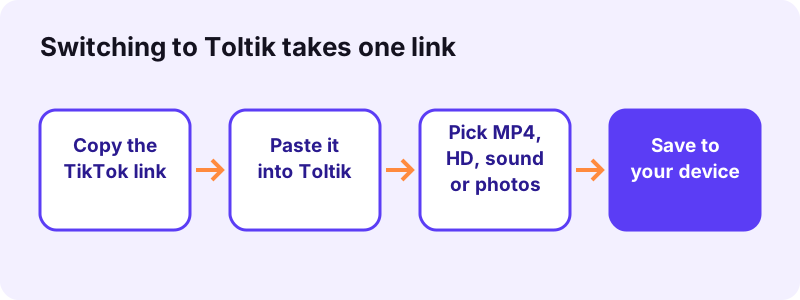
- Copy the TikTok link. Open the video, photo post or story in the TikTok app or on www.tiktok.com. Tap Share, then Copy link. On a computer, copy the address bar instead.
- Paste it into Toltik. Come back to this page, tap the box at the top and paste the link, or tap Paste. Then tap Download. The same link you used elsewhere works here.
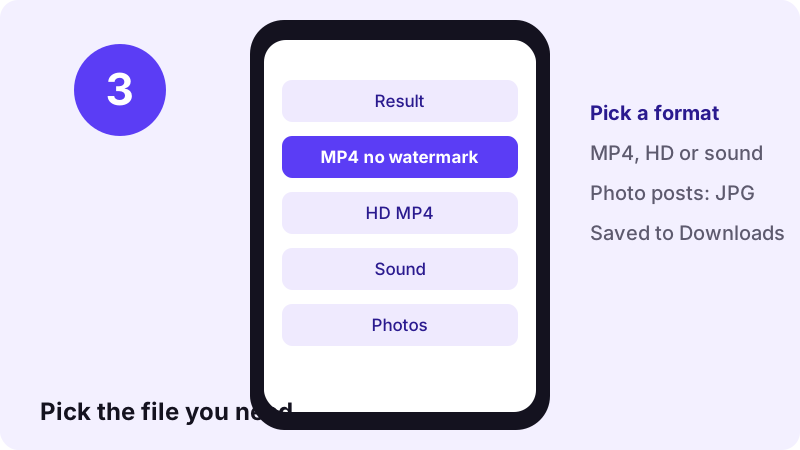
- Pick the file and save it. Choose the MP4 without watermark, the HD MP4 when TikTok has one, the sound, or the photos. Your browser saves the file to its usual downloads folder.
ssstik.io alternatives: the short answer
Most people who search for ssstik.io alternatives want the same three things: a TikTok video as an MP4 without the watermark, the sound as an audio file, or the pictures from a photo slideshow. Toltik does all three in your browser, with no app and no account.
Toltik is independent and is not affiliated with SnapTik, SSSTik or TikTok. Product names belong to their owners.
Toltik is the free TikTok downloader this site is built around. You paste the link of a public post into the box at the top of this page, and it gives you the files TikTok already serves for that post.
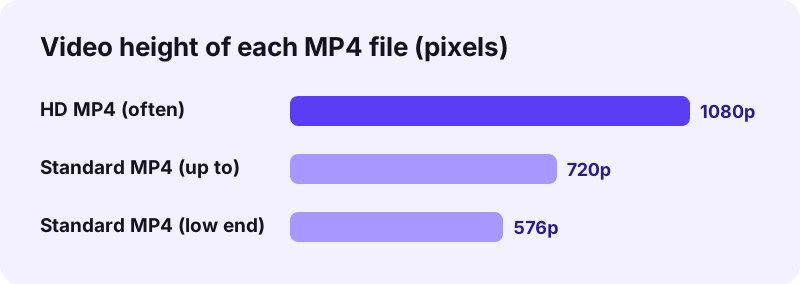
- An MP4 without the moving watermark, usually 576p to 720p.
- An HD MP4 when TikTok keeps one, often 1080p and encoded in H.265.
- The sound, as TikTok stores it (.mp3 or .m4a).
- Each picture of a photo post as its own JPG.
- Public stories while they are still live.
This guide is not a list of other download sites. We do not link to or recommend other downloaders. Instead, it compares Toltik with SSSTik only on what SSSTik says about itself, so you can decide which SSSTik alternative fits you.
Our own test, 11 October 2026: Toltik read 4 real TikTok posts in 0.6 to 1.8 seconds each, and all 9 files we asked for came back fine.
What SSSTik says it offers (checked 13 October 2026)
Before comparing ssstik.io alternatives, it helps to know what the original promises. We opened the SSSTik homepage on 13 October 2026 and wrote down what it states. We did not test its downloads, so the points below are its own claims, not our measurements.
Features its homepage lists
- It describes itself as a free TikTok download tool.
- It says you can save videos without any limits.
- It offers MP4 without the watermark, and MP3.
- It says it gives HD when a Full HD or higher copy is available.
- It says no TikTok account and no browser extension are needed.
- It says it works in Chrome, Firefox, Safari and Edge, on Windows, Mac and Linux.
- It mentions that photos can be downloaded too.
Limits its homepage states
- It says it cannot access or save videos from private accounts.
- It says iPhones on iOS 12 and below cannot download, and that updating iOS is needed.
Other things on the page
- Menu links for TikTok stories, MP3, an APK and an app install.
- Footer links to a TikTok viewer and to downloaders for other social networks.
- A language menu with 19 languages.
- A note that it is not affiliated with TikTok, Douyin or Bytedance.
In short, SSSTik and Toltik cover the same core job. Among ssstik.io alternatives, the differences are in the details:
- how the audio file is delivered,
- how photo posts are handled,
- whether an app is offered,
- how many languages each site has.
Why people look for an SSSTik alternative
People rarely leave a tool they are happy with. When someone types "ssstik.io alternatives" into a search box, there is usually a specific reason. Here are the common ones, and what Toltik does about each.
A link did not work today
Any downloader can fail on a given link, for example when a post was just deleted or made private. Having a second SSSTik alternative bookmarked means you can try the same link somewhere else in seconds.
You only need the sound or the photos
Many visitors do not want the video at all. They want the song for a ringtone or the pictures from a slideshow. Toltik has dedicated pages for the TikTok MP3 download and the TikTok photo downloader.
You prefer a browser-only tool
Some people do not want to install an APK or an app on their phone. Toltik has no app at all; it is a web page that works the same on iPhone, Android and a computer.
You want a page in your language
Toltik is written in five languages: English, Japanese, Spanish, Vietnamese and French. If you read one of those, the steps and the error messages will make sense to you.
- Need the video? Use the box at the top of this page.
- Need the sound? Use the MP3 page.
- Need slideshow images? Use the photo page.
- Need a story? Use the TikTok story downloader.
Toltik vs SSSTik: a neutral feature table
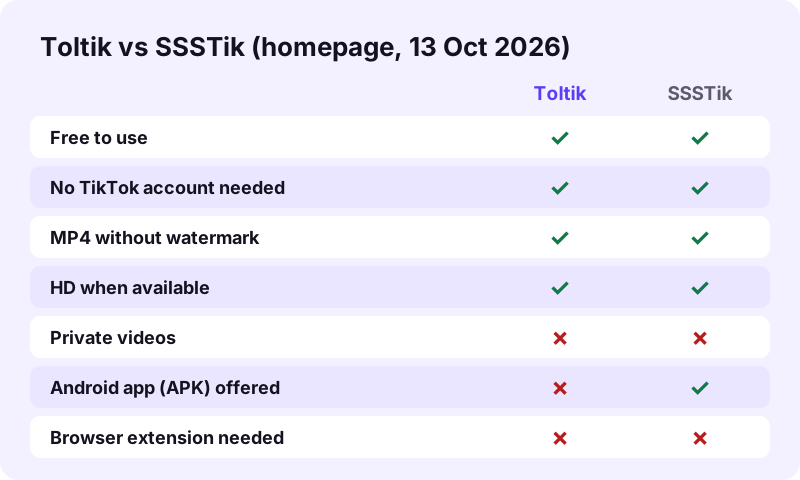
This is the core of any honest comparison of ssstik.io alternatives. The Toltik column describes what Toltik does. The SSSTik column only repeats what the SSSTik homepage stated on 13 October 2026. Where its homepage says nothing, we write "not stated" rather than guess.
| Feature | Toltik | SSSTik (per its homepage, checked 2026-10-13) |
|---|---|---|
| Price | Free | Free (stated) |
| TikTok account | Not needed | Not needed (stated) |
| MP4 without watermark | Yes | Yes (stated) |
| HD video | When TikTok has an HD copy, often 1080p H.265 | When Full HD or higher is available (stated) |
| Audio | The sound as TikTok stores it: .mp3 or .m4a | MP3 (stated) |
| Photo slideshows | Each picture as its own JPG, plus sound and cover | Says photos can be downloaded |
| Stories | Public stories while live | Menu link for TikTok stories |
| Private videos | No | No (stated) |
| App | None, browser only | Links to an APK and an app install |
| Browser extension | Not needed | Not needed (stated) |
| Other social networks | TikTok only | Footer links to other downloaders |
| Languages | 5 | 19 in its language menu |
Where the two are the same
Both are free, both run in a browser, both skip the TikTok account, and both say they save the MP4 without the watermark. Both also say plainly that private videos cannot be saved. On the basic job, picking between these ssstik.io alternatives is a matter of taste.
- Free, with no sign-up.
- Link in, file out, in any modern browser.
- MP4 without the watermark, HD when it exists.
- No private videos.
Where they differ
- Audio: Toltik hands you the sound file TikTok already has, without converting it. SSSTik describes its audio as MP3.
- Photos: Toltik splits a slideshow into separate JPG files.
- Apps: Toltik has none. SSSTik links to an APK.
- Scope: Toltik is TikTok only. SSSTik links to tools for other networks.
- Languages: SSSTik lists more languages.
We did not run speed or quality tests on SSSTik, so we make no claim about its speed, safety or file quality.
How to switch from SSSTik to Toltik
Moving between ssstik.io alternatives takes no setup. The link you copy for SSSTik is the same link Toltik reads. The tool box is already on this page, so you can follow along right now.
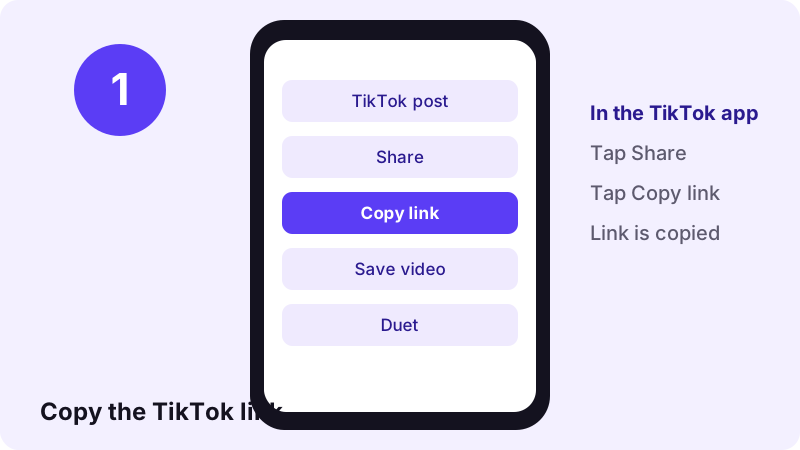
Step 1: copy the TikTok link
In the TikTok app, open the post and tap Share, then Copy link. On www.tiktok.com in a computer browser, click the address bar and copy the whole address.
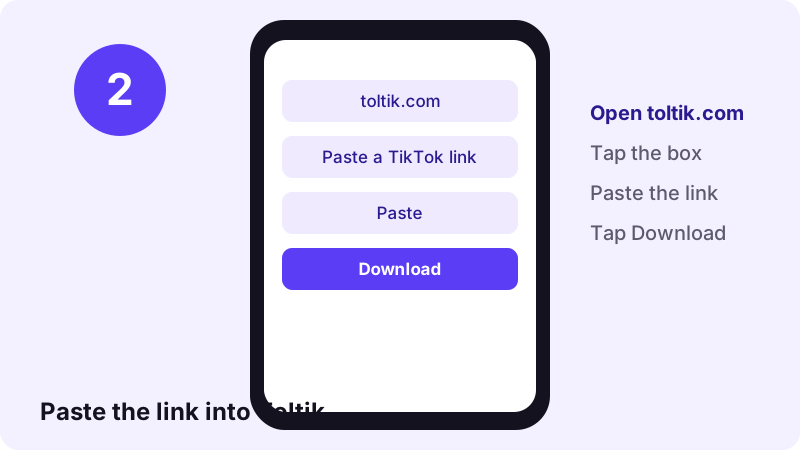
Step 2: paste it into the box above
Scroll back to the top of this page, tap the box and paste the link. The Paste button does it in one tap in most browsers. Then tap Download.
Step 3: choose your file and save it
After a second or two you see the result. Tap the file you want. Your browser saves it to its downloads folder, exactly as it would for any other file.
- Copy the TikTok link.
- Paste it into Toltik and tap Download.
- Pick MP4, HD MP4, sound or photos.
- Open the file from your downloads.
Want the same steps for a specific device? See the guides for iPhone and PC and Mac.
Save TikTok videos as MP4 without watermark
The MP4 without watermark is what most people want from ssstik.io alternatives. MP4 is the most common video file type; Wikipedia describes it as a digital multimedia container format used mostly for video and audio.
Standard MP4 vs HD MP4
Toltik shows up to two video files. The standard MP4 without watermark is usually 576p to 720p in H.264, which plays everywhere. The HD MP4 appears only when TikTok keeps an HD copy of that post.
- Pick the standard MP4 to share on chat apps or play on older devices.
- Pick the HD MP4 to edit, crop or watch on a large screen.
- Not sure? Save both; they are the same clip.
| File | Usual size | Codec | Best for |
|---|---|---|---|
| Standard MP4 | 576p to 720p | H.264 | Sharing, old phones and PCs |
| HD MP4 | Often 1080p | Often H.265 (HEVC) | Editing, big screens |
| Sound | About 0.25 MB per 15 s (M4A) | As TikTok stores it | Music, ringtones |
Playing the HD file
Because the HD copy is often H.265, some older devices may not play it. Apple's help page on HEVC media asks for iOS 11 or later, or macOS High Sierra or later, to view it (Apple Support). If a file does not play, use the standard MP4 instead.
- Update your phone or computer to a recent system version.
- Try a different video player app you already have.
- Fall back to the standard H.264 MP4, which plays almost everywhere.
Save TikTok sounds as MP3 or M4A
The second big reason to compare ssstik.io alternatives is audio. Toltik gives you the sound file TikTok already has for the post, so nothing is re-encoded and the quality stays as it was.
Why the file can be .m4a
TikTok stores many sounds as AAC audio, which saves as .m4a. Wikipedia notes that AAC was designed to be the successor of the MP3 format. Most phones, computers and editors play .m4a files without any extra app.
- iPhone and Mac: the Files app and Music play .m4a.
- Android: most music and file apps open it.
- Windows: the built-in media player opens it.
When you really need .mp3
Some older car stereos and tools only accept MP3. In that case, open the file in any audio app you already trust and export it as MP3. Converting a lossy file again can lose a little quality, so keep the original too.
- Our test: a 15-second sound came out as a 0.25 MB M4A file.
- Full steps are on the TikTok MP3 page.
- Original sounds belong to their creators; licensed songs belong to the labels.
Save photo slideshows and stories
Photo posts are where ssstik.io alternatives differ the most. Toltik treats a slideshow as a set of pictures, not as a video, so you get every image as a separate JPG.
Photo slideshows as JPG files
- Paste the link of the photo post.
- Toltik lists each picture, plus the sound and the cover.
- Save one picture or all of them.
- More details on the photo downloader page.
Public stories
Stories disappear after a short time. While a public story is still live, you can paste its link on the story downloader page and save it as an MP4 or as audio.
- Copy the story link while it is live.
- Paste it on the story page.
- Save the MP4 or the sound before it expires.
Where your downloads go on iPhone, Android and PC
A common complaint after switching to any SSSTik alternative is "I downloaded it, but where is it?" The answer depends on your browser, not on the downloader.
On iPhone and iPad
Safari saves files into the Files app. Apple explains it this way:
“In the Files app, you can find and view your documents, images, and other files that you downloaded from the internet or your mail app.”
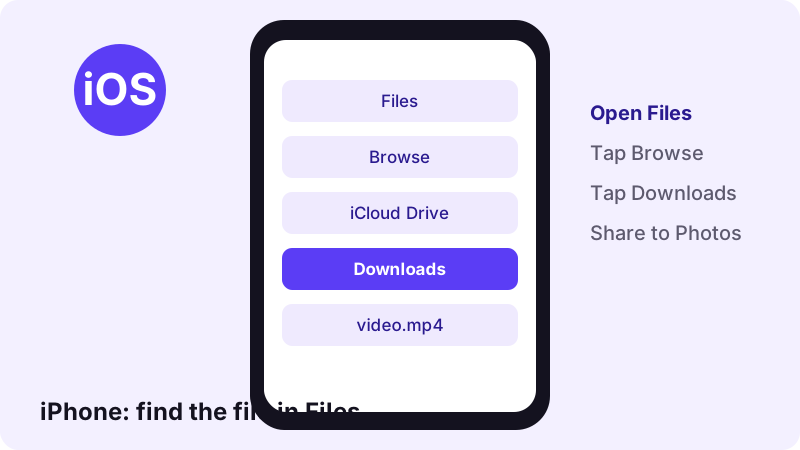
Open Files, tap Browse, then Downloads. Apple adds that if you do not see the Downloads folder, you should tap iCloud Drive. To move a video to Photos, open it and use the share icon.
On Android
Chrome and most other Android browsers save files to the Downloads folder. Open your Files or My Files app and look there, or open the browser menu and tap Downloads.
- Files by Google or My Files: open Downloads.
- Gallery or Photos: new videos usually appear on their own.
- Chrome: menu, then Downloads.
On Windows, Mac and Linux
In Chrome on a computer, the download shows up near the address bar:
“When you begin a download, a Download in progress icon appears on the top right next to the address bar. Once the download completes, the Download tray opens.”
The file itself goes to your default downloads folder. The full walk-through is in our guide to downloading TikTok videos on PC.
How to judge any SSSTik alternative
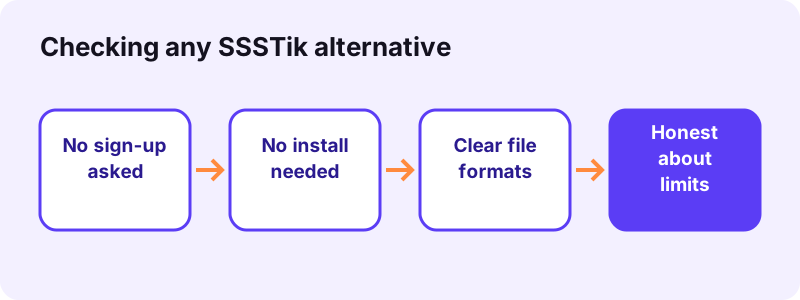
You may still test other ssstik.io alternatives, and that is fine. We will not name them, but here is a simple checklist that works on any TikTok downloader, including ours.
Green flags
- It works with just a link, with no sign-up.
- It does not ask for your TikTok password.
- It tells you the file type and quality before you save.
- It says clearly that private videos cannot be saved.
- It explains who owns the videos and how to use them fairly.
Things to be careful with
- A page that asks you to log in with your TikTok account.
- A download that is a program (.exe or .apk) when you expected a video.
- Pop-ups that ask for notification permission before you get your file.
- A promise to save private videos or drafts.
If you came from SnapTik
Many people try more than one tool. If you arrived here after using SnapTik, our separate SnapTik alternative comparison uses the same neutral method for that site.
Troubleshooting: when a TikTok link will not download
Most errors are not caused by the downloader. They come from the post itself. Before you give up on Toltik or any other SSSTik alternative, run through these checks.
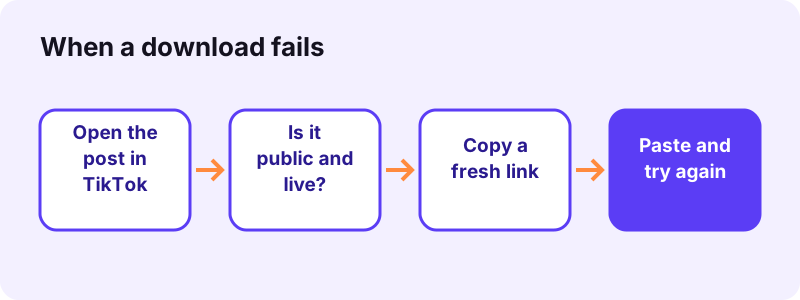
| What you see | Likely cause | What to do |
|---|---|---|
| Link not recognised | The link is cut short or has extra text | Copy the link again with Share, then Copy link |
| Video not found | The post was deleted or made private | Open it in TikTok to check it still plays |
| No HD button | TikTok has no HD copy of this post | Use the standard MP4 |
| HD file does not play | Your device lacks H.265 support | Use the standard MP4 or update your system |
| File not found after download | It went to the browser's downloads folder | Check Files (iPhone) or Downloads (Android, PC) |
The post is private or deleted
Toltik only works with public posts. It cannot open private accounts, "Friends" posts or drafts. If the post does not play for a logged-out visitor on www.tiktok.com, it will not download either.
- Private accounts: not supported.
- Friends-only posts: not supported.
- Drafts: not supported.
- Deleted posts: gone for every tool, including all ssstik.io alternatives.
The creator turned off downloads
Some creators turn off downloads in the app. Respect that choice: save other people's videos only for personal viewing, or when you have their permission.
Copyright, trademarks and fair use
Saving a video does not give you the right to reuse it. The creator still owns it. This matters no matter which of the ssstik.io alternatives you use.
What fair use means
In the United States, the Copyright Office explains:
“Fair use is a legal doctrine that promotes freedom of expression by permitting the unlicensed use of copyright-protected works in certain circumstances.”
The Copyright Office lists four factors that courts weigh:
- Purpose and character of the use.
- Nature of the copyrighted work.
- Amount and substantiality of the portion used.
- Effect of the use upon the potential market for or value of the copyrighted work.
- Keep downloads of other people's videos for personal viewing.
- Ask the creator before you repost, remix or use a clip commercially.
- Always credit the creator by name when you share.
- Rules differ by country; when in doubt, ask for permission.
Why we name SSSTik on this page
We mention SSSTik only to compare it with Toltik, which is the kind of reference trademark law calls nominative use. Wikipedia describes it as the case where:
“a person may use the trademark of another as a reference to describe the other product, or to compare it to their own.”
Toltik is independent and is not affiliated with SnapTik, SSSTik or TikTok. Product names belong to their owners. TikTok itself is made by ByteDance, as Wikipedia's TikTok article explains.
Which SSSTik alternative should you pick?
If you just want a clean MP4, the original sound and slideshow photos as separate JPGs, with no app and no account, Toltik is a simple choice among ssstik.io alternatives. If you need an Android APK or downloads from other social networks, SSSTik says it offers those and Toltik does not.
- Pick Toltik for TikTok-only, browser-only downloads in five languages.
- Keep a second tool bookmarked for days when one link fails.
- Whatever you use, save public posts only and credit creators.
Ready? Scroll up, paste your link and try the TikTok video downloader now. It also handles HD TikTok downloads when TikTok has an HD copy.
Frequently asked questions
What are the best ssstik.io alternatives?
We do not rank other download sites. Toltik is a free SSSTik alternative that saves public TikToks as MP4 without watermark, HD when available, the sound as .mp3 or .m4a, and slideshow photos as JPG, all in the browser.
Is Toltik the same as SSSTik?
Toltik is independent and is not affiliated with SnapTik, SSSTik or TikTok. Product names belong to their owners. The two are separate tools that do a similar job.
Does Toltik remove the TikTok watermark?
Toltik gives you the copy TikTok serves without the moving watermark. It does not edit the video; it saves the file that already exists.
Can I download TikTok audio as MP3?
Yes. Toltik saves the sound as TikTok stores it, which is .mp3 or .m4a (AAC). Both play on almost every phone and computer.
Can Toltik save TikTok photo slideshows?
Yes. Paste the link of a photo post and Toltik lists each picture as a separate JPG, plus the sound and the cover image.
Can I download private TikTok videos?
No. Toltik only works with public posts. Private, Friends-only, deleted and draft videos cannot be downloaded. SSSTik's homepage says the same about private accounts.
Do I need an app or an account?
No. Toltik is a web page. It needs no TikTok account, no sign-up and no app on iPhone, Android or a computer.
Why is there no HD button for my video?
The HD MP4 appears only when TikTok keeps an HD copy of that post. If there is none, the standard MP4 without watermark is the best version that exists.
Where are the files saved?
Your browser decides. On iPhone they go to the Files app, in Downloads. On Android and computers they go to the Downloads folder.
Is it legal to download TikTok videos?
Saving your own videos is fine. For other people's videos, keep them for personal viewing or get the creator's permission before you share or reuse them. Rules vary by country.
Guides
Video — Save TikTok videos as MP4 without watermark, in HD.
- Looking for a SnapTik Alternative? Try Toltik
- Does TikTok notify when you save a video?
- How to Save a TikTok Draft Without Posting It
- How to Download TikTok Videos on iPhone
- TikTok Video Not Downloading? How to Fix It
- How to Download TikTok Videos on PC and Mac
- How to Download Private TikTok Videos (What Really Works)
Sources
- Find your downloaded files on iPhone — Apple Support
- Using HEIF or HEVC media on Apple devices — Apple Support
- Download a file — Google Chrome Help
- Fair Use Index — U.S. Copyright Office
- Nominative use — Wikipedia
- MP4 file format — Wikipedia
- MP3 — Wikipedia
- Advanced Audio Coding — Wikipedia
- TikTok — Wikipedia